<!DOCTYPE html>
<html lang="en"><!-- InstanceBegin template="/Templates/html.dwt.php" codeOutsideHTMLIsLocked="false" -->
<head>
	<!-- InstanceBeginEditable name="doctitle" -->
    <title>How to Embed Video in HTML5 - Tutorial Republic</title>
    <meta name="description" content="In this tutorial you will the various techniques of inserting videos in an HTML document such as the new HTML5 video tag or the all time favorite YouTube videos." />
    <!-- InstanceEndEditable -->
    	<meta charset="UTF-8" />
<meta name="viewport" content="width=device-width, initial-scale=1" />
<meta property="fb:admins" content="100001054961582" />
<meta property="fb:app_id" content="1404574483159557" />
<meta property="og:image" content="/lib/images/signature.png" />
<link rel="shortcut icon" type="image/x-icon" href="../favicon.png" />
<style>
html,body,h1,h2,h3,h4,h5,h6,p,blockquote,pre,img{margin:0;padding:0;border:0;font-size:100%;font:inherit;vertical-align:baseline}
html,body{min-height:100%}
p{margin:0 0 12px}
ol,ul{margin:0 0 12px}
a,a:active,a:visited{outline:none;color:#1db79f;text-decoration:none}
a img{border:none;outline:none}
p code,table td:last-child code,.content ul li code,code.mark{padding:2px 4px;color:#333;background-color:#f1f1f1;border-radius:4px}
a code{color:inherit;background:none;padding:0}
table{border-collapse:collapse;border-spacing:0}
table td{vertical-align:top}
body{min-width:1300px;color:#414141;background:#fafafa;font-family:-apple-system,BlinkMacSystemFont,"Segoe UI","Helvetica Neue",sans-serif;font-size:17px;line-height:1.7}
input,select,textarea,button,div,span,a{box-sizing:border-box}
h1,h2,h3,h4{color:#262626;margin:20px 0 10px;line-height:1.5;font-weight:600}
h1{font-size:34px;margin-top:17px}
h2{font-size:28px}
h3{font-size:22px}
.space{margin-bottom:25px!important}
.break{margin-bottom:15px!important}
.text-center{text-align:center!important}
.scroll{height:195px;overflow-y:scroll}
.scroll.large{height:245px}
.scroll.xlarge{height:290px}
.scroll.xxlarge{height:340px}
sup{font-size:13px}
h1 sup{background:#ec0000;border-radius:3px;padding:5px 10px;font-size:15px;color:#fff;position:relative;top:5px}
.leaderboard{padding-top:14px;position:relative;height:105px;overflow:hidden}
.intro-image img{display:block;padding:10px 0 25px;max-width:100%}
.clearfix::after{content:".";display:block;height:0;clear:both;visibility:hidden}
code,.code,.syntax,.green-box,.sky-box,.gray-box,.pink-box,.red-box,.at-rule,.codebox pre,.console-output,.command{font-size:16px;font-family:Consolas,Monaco,Courier,monospace}
.console-output{margin:15px 0}
.command{background:#f2f2f2;padding:16px 18px;margin:15px 0 25px;border-radius:3px}
hr{border:none;border-bottom:1px solid #e7e9ed;height:1px;margin:30px 0}
.summary,.topic{border:1px solid #eaeaea;border-width:1px 0;margin:20px 0;padding:10px 0;color:#8e9aa6;line-height:1.5}
h2.section-title span{display:inline-block;border-bottom:4px solid #c9d7e0;padding:0 50px 12px 0}
.wrapper{width:1300px;padding:0 15px;margin:0 auto}
.header{background:#23384e;padding:16px 0}
input.search{background:#fff;border:0 none;color:#807E7E;float:left;height:38px;line-height:26px;font-size:14px;margin:0 0 0 12px;outline:medium none;padding:6px 14px;width:500px;border-radius:2px;box-shadow:0 0 1px rgba(0,0,0,0.6);font-family:inherit}
.search-btn{color:rgba(0,0,0,.6);background:#ebebeb;border:none;outline:none;cursor:pointer;float:left;height:38px;line-height:46px;width:44px;display:block;margin-left:-2px;border-radius:0 2px 2px 0;box-shadow:0 0 1px rgba(0,0,0,0.7)}
.logo{width:304px}
.logo img{height:44px;margin:-3px 0;display:block}
.site-search{float:left;margin-left:100px}
.menu{background-color:#f5f5f5;box-shadow:0 1px 1px rgba(0,0,0,.15);position:relative;z-index:9}
.menu a{color:#666;display:inline-block;padding:0 10px;text-decoration:none;font-size:14px;font-weight:600;height:48px;line-height:48px}
.menu a:first-child{margin-left:-10px}
.menu a.tool-link{float:right;display:block;border-radius:30px;line-height:28px;position:relative;height:auto;top:9px;padding:0 12px;color:#1ebba3;border:1px double #1ebba3}
.fl,.logo{float:left}
.leftcolumn{width:240px;float:left;font-size:16px;color:#4f4f4f}
.centercolumn{width:850px;float:left}
.rightcolumn{width:180px;float:left}
.content{background:#fff;padding:15px 40px 20px;border:1px solid #dedede;border-top:none;border-radius:1px}
.sidebar{width:160px;float:left;padding-top:28px;margin-left:20px;position:relative}
.leftcolumn .segment{margin:16px 0 12px;position:relative;font-size:18px;font-weight:600;line-height:normal}
.leftcolumn a{color:#4f4f4f;font-size:16px;line-height:26px;display:block;border-bottom:1px solid transparent}
.leftcolumn ul{list-style:none;padding:0;margin:0}
.segment,.chapters,.chapters a{float:left;clear:both}
h1 code,h2 code,h3 code{font:inherit}
.color-box{margin:15px 0;padding-left:20px}
.note-box,.warning-box,.tip-box{padding:8px 8px 3px 26px}
.info-tab{float:left;margin-left:-23px}
.content ul li{margin-top:7px}
.extra{padding-top:5px}
.green-box,.sky-box,.gray-box,.red-box,.pink-box{color:#000;margin-top:15px;padding:10px;background-color:#f6f8fa;border:1px solid #d7e2ec}
.example{background:#f4f5f6;padding:3px;margin:15px 0}
.codebox{background:#fff;border:1px solid #ddd}
.codebox-title{height:41px;padding-left:12px;border-bottom:1px solid #ddd;background:#f5f5f5}
.codebox-title h4{margin:0;font-size:18px;line-height:40px;float:left;font-weight:600}
a.try-btn,a.download-btn{width:140px;height:40px;color:#333;font-size:15px;line-height:41px;font-weight:600;text-align:center;text-decoration:none;float:right;display:block;border-left:1px solid #ddd;background:rgba(27,31,35,0.08);box-sizing:border-box;font-family:Arial,sans-serif}
a.try-btn span{font-size:18px;line-height:normal}
.hide,.code-style,.box-size,.bottom-link,.footer,.code-style,.snippets,.report-error,.badge,.social,.ad-label,.mobile-only,ul.tree-menu li ul{display:none}
.skyscraper{width:160px;height:600px;overflow:hidden;margin-bottom:20px;background:#ebecf0}
.bottom-ad{margin-top:46px;padding:24px;position:relative;background:url(../lib/images/smooth-line.png) no-repeat center #f9f9f9}
.rectangle-left,.rectangle-right{min-width:336px;min-height:280px;overflow:hidden}
.fr,a.previous-page,a.next-page,.rectangle-right,.topic-nav{float:right}
a.previous-page,a.next-page{width:32px;height:32px;line-height:30px}
.shadow{background:#F7F8F9;padding:3px;margin:10px 0}
.syntax{color:#2f4959;padding:13px 18px;background:#F9F9FA;border:1px solid #ddd;font-size:15px}
code[class*="language-"],pre[class*="language-"]{color:#000;background:none;font-family:Consolas,Monaco,'Andale Mono','Ubuntu Mono',monospace;text-align:left;white-space:pre;word-break:normal;word-wrap:normal;line-height:1.5;tab-size:4;hyphens:none}
pre[class*="language-"]{position:relative;margin:.5em 0;overflow:visible;padding:0}
pre[class*="language-"]>code{position:relative;border-left:10px solid #358ccb;box-shadow:-1px 0 0 0 #358ccb,0 0 0 1px #dfdfdf;background-color:#fdfdfd;background-image:linear-gradient(transparent 50%,rgba(69,142,209,0.04) 50%);background-size:3em 3em;background-origin:content-box;background-attachment:local}
code[class*="language"]{max-height:inherit;height:inherit;padding:0 1em;display:block;overflow:auto}
:not(pre) > code[class*="language-"]{position:relative;padding:.2em;border-radius:.3em;color:#c92c2c;border:1px solid rgba(0,0,0,0.1);display:inline;white-space:normal}
pre[class*="language-"].line-numbers{padding-left:0}
pre[class*="language-"].line-numbers code{padding-left:3.8em}
pre[class*="language-"].line-numbers .line-numbers-rows{left:0}
pre[class*="language-"][data-line]{padding-top:0;padding-bottom:0;padding-left:0}
pre[data-line] code{position:relative;padding-left:4em}
pre .line-highlight{margin-top:0}
pre.line-numbers{position:relative;padding-left:3.8em;counter-reset:linenumber;white-space:pre-wrap!important}
pre.line-numbers > code{position:relative;white-space:inherit}
.line-numbers-rows,.codebox pre.inactive{display:none}
.codebox pre.syntax-highlighter{margin:0;padding:0;overflow:auto}
pre.line-numbers .line-numbers-rows{border-right:3px solid #6CE26C}
.codebox pre.syntax-highlighter > code{box-shadow:none!important;padding-left:3.8em;background-image:linear-gradient(transparent 50%,#F8F8F8 50%);font-family:Consolas,Monaco,'Andale Mono','Ubuntu Mono',monospace!important;font-size:16px;line-height:1.5;overflow-wrap:break-word}
.codebox pre.syntax-highlighter,.codebox pre.syntax-highlighter code{border:none;width:100%;box-sizing:border-box}
pre.line-numbers code,pre.line-numbers .line-numbers-rows{padding-top:2px;padding-bottom:2px}
.preview-box{padding:15px;text-align:center;cursor:pointer;overflow:hidden;background:#FFF;border:1px solid #e6e6e6}
.preview-box a,.preview-box img{display:block;margin:0 auto}
.download-box{text-align:center;padding:20px 0;margin:20px 0 10px}
.output-box{border-color:#d4d4d4;border-style:solid;border-width:1px 0;padding:5px 15px;overflow:hidden;background:#fff;margin:10px 0}
.demo-box{margin-top:15px}
.subhead{border-bottom:3px solid #DCE3EB;margin-bottom:15px;padding-bottom:10px}
table.data,table.description{width:100%;font-size:92%}
table.data th{color:#000;padding:8px 7px;text-align:left;font-size:15px;background:#F8F8F8}
table.data td{color:#484848;padding:5px 7px;background:#fff}
table.data th,table.data td{vertical-align:top;border:1px solid #DCE3EB}
table.data tr.section th,table.data td.section{font-size:15px;background:#f0f4f7}
table.description th{width:150px}
table.no-wrap tr td:first-child{white-space:nowrap}
.topic-nav{padding-right:5px;color:#d0d0d0}
.topic-nav a{padding:0 15px;margin:0 0 0 5px;position:relative;display:inline-block}
.topic-nav a::after{font-size:24px;position:absolute;line-height:22px}
.topic-nav a:first-child{margin:0 5px 0 0}
.topic-nav a:first-child::after{content:'\00AB';left:-5px}
.topic-nav a:last-child::after{content:'\00BB';right:-5px}
@media screen and (max-width: 1280px) {
body{min-width:1260px}
.wrapper{width:1260px}
.leftcolumn{width:230px}
.centercolumn{width:820px}
.preview-box img{max-width:100%;height:auto}
}
@media screen and (max-width: 800px) {
body{min-width:100%;max-width:100%;padding-top:46px}
.wrapper{width:100%;padding:0}
.header{height:46px;padding:5px 0;position:fixed;top:0;left:0;right:0;width:100%;z-index:99}
.logo{width:auto;display:block;padding:6px 0 0 60px;position:absolute;left:0;z-index:100}
.logo img{height:30px}
.menu{width:100%;padding-left:12px;padding-right:12px;overflow-x:auto;white-space:nowrap}
.centercolumn{width:100%;float:none}
.content{padding:10px;border-width:0 0 1px 0}
.content img{max-width:100%;height:auto}
.skyscraper{display:inline-block}
.shadow,.example,.console-output,.content pre{max-width:100%;overflow-x:auto}
.codebox-title{position:relative}
.codebox.multi-style-mode pre{padding-top:7px;margin-top:36px;border-top:1px solid #ddd}
.bottom-ad{height:auto;background:none;padding:30px 0 0;margin:40px 0 0;text-align:center;position:relative}
.rectangle-left,.rectangle-right{float:none;display:inline-block;margin:10px auto;background:#EDEEF2}
.leftcolumn,.footer,.social,.site-search,.code-style,.menu a.tool-link,.backdrop{display:none}
.summary,.topic{padding:5px 0;margin:10px 0}
.leftcolumn,.centercolumn,.rightcolumn,.sidebar{float:none}
.header,.menu,.centercolumn,.footer,.appeal-text{width:100%}
a.try-btn,a.download-btn{width:130px}
.native-unit{margin-bottom:30px}
.rightcolumn,.sidebar{margin: 25px auto 0}
.overview{padding-right:0}
.scroll-pane{overflow-x:auto}
table.data{min-width:480px}
table.data pre{display:inline;white-space:normal}
table tr th,table tr td{width:auto!important}
.preview-box{padding:6px}
.leaderboard{margin:20px 0}
h1{font-size:30px}
h2{font-size:24px}
h3{font-size:20px}
.codebox pre.syntax-highlighter{overflow-x:auto}
.codebox pre.syntax-highlighter > code{min-width:614px;height:auto;overflow-x:hidden}
}
@media screen and (min-width: 801px) {
.site-search,.leftcolumn,.social{display:block!important}
.backdrop{display:none!important}
.hide-scroll{overflow-x:hidden!important}
}
.menu a.old-version{height:21px;font-size:13px;line-height:17px;border:1px double;border-radius:40px;margin-right:10px}</style>
<script>
    (function(){
        var bsa_optimize=document.createElement('script');
        bsa_optimize.type='text/javascript';
        bsa_optimize.async=true;
        bsa_optimize.src='https://cdn4.buysellads.net/pub/tutorialrepublic.js';
        (document.getElementsByTagName('head')[0]||document.getElementsByTagName('body')[0]).appendChild(bsa_optimize);
    })();
</script>
    
    <!-- InstanceBeginEditable name="head" -->
    <!-- InstanceEndEditable -->
    
	<script async src="https://www.googletagmanager.com/gtag/js?id=UA-40117907-1"></script>
<script>
  window.dataLayer = window.dataLayer || [];
  function gtag(){dataLayer.push(arguments);}
  gtag('js', new Date());

  gtag('config', 'UA-40117907-1');
</script></head>
<body>
    <!--Header-->
    
<div class="header">
    <div class="wrapper clearfix">
        <button type="button" class="open-menu mobile-only"><i class="icon-menu"></i></button>
        <div class="logo">
            <a href="../index.html"><img src="../lib/images/logo.svg" alt="TutorialRepublic" /></a>
        </div>
        <div class="site-search">
            <form action="https://www.google.com/search" method="get" target="_blank" class="clearfix">
                <input type="hidden" value="www.tutorialrepublic.com" name="sitesearch" />
                <input type="text" name="q" placeholder="Search topics, tutorials, questions and answers..." id="searchInput" class="search" />
                <button type="submit" class="search-btn"><span class="icon-search"></span></button>
            </form>
        </div>
        <div class="social">                
            <a href="https://www.facebook.com/tutorialrepublic" target="_blank" title="Join us on Facebook"><i class="icon-facebook"></i></a>
            <a href="https://twitter.com/tutrepublic" target="_blank" title="Follow us on Twitter"><i class="icon-twitter"></i></a>
            <a href="../contact-us.php.html" target="_blank" title="Send us an Email"><i class="icon-mail"></i></a>
        </div>
        <button type="button" class="open-search mobile-only">
            <i class="icon-search"></i>
        </button>
    </div>    
</div>
<div class="menu">
    <div class="wrapper">
        <a href="../index.html" title="Home Page">HOME</a>
        <a href="html-introduction.php.html" title="HTML Tutorial">HTML5</a>            
        <a href="../css-tutorial/index.html" title="CSS Tutorial">CSS3</a>
        <a href="../javascript-tutorial/index.html" title="JavaScript Tutorial">JAVASCRIPT</a>
        <a href="../jquery-tutorial/index.html" title="jQuery Tutorial">JQUERY</a>
        <a href="../twitter-bootstrap-tutorial/index.html" title="Bootstrap 5 Tutorial">BOOTSTRAP5</a>
		<a href="https://www.tutorialrepublic.com/twitter-bootstrap-4-tutorial/" class="old-version" title="Bootstrap 4.6 Tutorial">v4.6</a>
        <a href="../php-tutorial/index.html" title="PHP Tutorial">PHP7</a> 
        <a href="../sql-tutorial/index.html" title="SQL Tutorial">SQL</a>
        <a href="../references.php.html" title="Web References">REFERENCES</a>
        <a href="../practice-examples.php.html" title="Practice Examples and Demos">EXAMPLES</a>
        <a href="../faq.php.html" title="Frequently Asked Questions and Answers">FAQ</a>
        <a href="../snippets/gallery.php.html" title="Bootstrap Code Snippets" target="_blank">SNIPPETS</a>
        <a href="../codelab.php.html" class="tool-link" target="_blank">Online HTML Editor</a>
    </div>        
</div>    <!--End:Header-->
    <div class="wrapper clearfix">
        <div class="leftcolumn" id="myNav">
		
        <div class="segment"><span>HTML</span> BASIC</div>
<div class="chapters">
    <a href="html-introduction.php.html">HTML Introduction</a>
    <a href="html-get-started.php.html">HTML Getting Started</a>
    <a href="html-elements.php.html">HTML Elements</a>
    <a href="html-attributes.php.html">HTML Attributes</a>
    <a href="html-headings.php.html">HTML Headings</a>
    <a href="html-paragraphs.php.html">HTML Paragraphs</a>
    <a href="html-links.php.html">HTML Links</a>
    <a href="html-text-formatting.php.html">HTML Text Formatting</a>
    <a href="html-styles.php.html">HTML Styles</a>
    <a href="html-images.php.html">HTML Images</a>
    <a href="html-tables.php.html">HTML Tables</a>
    <a href="html-lists.php.html">HTML Lists</a>
    <a href="html-forms.php.html">HTML Forms</a>
    <a href="html-iframes.php.html">HTML Iframes</a>
</div>
<div class="segment"><span>HTML</span> ADVANCED</div>
<div class="chapters">
    <a href="html-doctypes.php.html">HTML Doctypes</a>
    <a href="html-layout.php.html">HTML Layout</a>
    <a href="html-head.php.html">HTML Head</a>
    <a href="html-meta.php.html">HTML Meta</a>
    <a href="html-scripts.php.html">HTML Scripts</a>
    <a href="html-entities.php.html">HTML Entities</a>
    <a href="html-url.php.html">HTML URL</a>
    <a href="html-url-encode.php.html">HTML URL Encode</a>
    <a href="html-validation.php.html">HTML Validation</a>
</div>
<div class="segment"><span>HTML5</span> FEATURES</div>
<div class="chapters">
	<a href="html5-new-input-types.php.html">HTML5 New Input Types</a>
    <a href="html5-canvas.php.html">HTML5 Canvas</a>
    <a href="html5-svg.php.html">HTML5 SVG</a>
    <a href="html5-audio.php.html">HTML5 Audio</a>
    <a href="html5-video.php.html">HTML5 Video</a>
    <a href="html5-web-storage.php.html">HTML5 Web Storage</a>
    <a href="html5-application-cache.php.html">HTML5 Application Cache</a>
    <a href="html5-web-workers.php.html">HTML5 Web Workers</a>
    <a href="html5-server-sent-events.php.html">HTML5 SSE</a>
    <a href="html5-geolocation.php.html">HTML5 Geolocation</a>
    <a href="html5-drag-and-drop.php.html">HTML5 Drag &amp; Drop</a>
</div>
<div class="segment"><span>HTML5</span> EXAMPLES</div>
<div class="chapters">
    <a href="../html-examples.php.html">HTML5 Practice Examples</a>
	<a href="../faq.php.html#html-css">HTML5 FAQ's Answers</a>
</div>
<div class="segment"><span>HTML5</span> REFERENCE</div>
<div class="chapters">
    <a href="../html-reference/html-tag-list.php.html">HTML5 Tags/Elements</a>
	<a href="../html-reference/html-common-attributes.php.html">HTML5 Global Attributes</a>
    <a href="../html-reference/html5-event-attributes.php.html">HTML5 Event Attributes</a>
    <a href="../html-reference/html-language-codes.php.html">HTML5 Language Codes</a>
    <a href="../html-reference/html-character-entities.php.html">HTML5 Character Entities</a>
    <a href="../html-reference/http-status-codes.php.html">HTTP Status Codes</a>
	<a href="../html-reference/html-color-picker.php.html">HTML5 Color Picker</a>
	<a href="../references.php.html" class="more">More references</a>
</div>        
                </div>
        <div class="centercolumn">
            <!--Text Content-->
            <div class="content">
                <div class="leaderboard">

    <div class="ad-label">Advertisements</div>

    <div class="ad-container">
        <script async src="https://pagead2.googlesyndication.com/pagead/js/adsbygoogle.js"></script>
        <!-- Responsive Leaderboard -->
        <ins class="adsbygoogle"
                style="display:block;max-width:728px;width:100%;height:90px"
                data-ad-client="ca-pub-9107540490929984"
                data-ad-slot="4302666817"></ins>
        <script>
        (adsbygoogle = window.adsbygoogle || []).push({});
        </script>
    </div>

    <!-- ABR Leaderboard -->
    <div id="bsa-zone_1579648332258-0_123456"></div>

</div>                <!-- InstanceBeginEditable name="main_content" -->
            	<a href="html5-audio.php.html" class="previous-page" title="Go to Previous Page"></a>
                <a href="html5-web-storage.php.html" class="next-page" title="Go to Next Page"></a>
                <h1>HTML5 <span>Video</span></h1>
                <p class="summary">In this tutorial you will learn how to embed video into an HTML document.</p>
                <h2>Embedding Video in HTML Document</h2>
                <p>Inserting video onto a web page was not relatively easy, because web browsers did not have a uniform standard for defining embedded media files like video.</p>
                <p class="space">In this chapter we'll demonstrates some of the many ways of adding videos on web pages, from the latest HTML5 <code>&lt;video&gt;</code> element to the popular YouTube videos.</p>
                <h2>Using the HTML5 video Element</h2>
                <p>The newly introduced HTML5 <code>&lt;video&gt;</code> element provides a standard way to embed video in web pages. However, the video element is relatively new, but it works in most of the modern web browsers.</p>
				<p>The following example simply inserts a video into the HTML document, using the browser default set of controls, with one source defined by the <code>src</code> attribute.</p>
                <!--Code box-->
                <div class="example">
                    <div class="codebox">
                        <div class="codebox-title"><h4>Example</h4><a href="../codelab.php%3Ftopic=html5&amp;file=video-element.html" target="_blank" class="try-btn" title="Try this code using online Editor">Try this code <span>&raquo;</span></a></div>
                        <pre class="syntax-highlighter line-numbers"><code class="language-markup">&lt;video controls="controls" src="media/shuttle.mp4"&gt;
    Your browser does not support the HTML5 Video element.
&lt;/video&gt;</code></pre>
                    </div>
                </div>
                <!--End:Code box-->
                <p>A video, using the browser default set of controls, with alternative sources.</p>
                <!--Code box-->
                <div class="example">
                    <div class="codebox">
                        <div class="codebox-title"><h4>Example</h4><a href="../codelab.php%3Ftopic=html5&amp;file=video-element-with-alternative-sources.html" target="_blank" class="try-btn" title="Try this code using online Editor">Try this code <span>&raquo;</span></a></div>
                        <pre class="syntax-highlighter line-numbers"><code class="language-markup">&lt;video controls="controls"&gt;
    &lt;source src="media/shuttle.mp4" type="video/mp4"&gt;
    &lt;source src="media/shuttle.ogv" type="video/ogg"&gt;
    Your browser does not support the HTML5 Video element.
&lt;/video&gt;</code></pre>
                    </div>
                </div>
                <!--End:Code box-->
                <hr />
                <h2>Using the object Element</h2>
                <p>The <code>&lt;object&gt;</code> element is used to embed different kinds of media files into an HTML document. Initially, this element was used to insert ActiveX controls, but according to the specification, an object can be any media object such as video, audio, PDF files, Flash animations or even images.</p>
                <p>The following code fragment embeds a Flash video into a web page.</p>
                <!--Code box-->
                <div class="example">
                    <div class="codebox">
                        <div class="codebox-title"><h4>Example</h4><a href="../codelab.php%3Ftopic=html5&amp;file=insert-video-using-object-element.html" target="_blank" class="try-btn" title="Try this code using online Editor">Try this code <span>&raquo;</span></a></div>
                        <pre class="syntax-highlighter line-numbers single-line"><code class="language-markup">&lt;object data="media/blur.swf" width="400px" height="200px"&gt;&lt;/object&gt;</code></pre>
                    </div>
                </div>
                <!--End:Code box-->
                <p>Only browsers or applications that support Flash will play this video.</p>
                <!--Warning box-->
                <div class="color-box">
                    <div class="shadow">
                        <div class="info-tab warning-icon" title="Warning"><i></i></div>
                        <div class="warning-box">
                            <p><strong>Warning:</strong> The <code><a href="../html-reference/html-object-tag.php.html">&lt;object&gt;</a></code> element is not supported widely and very much depends on the type of the object that's being embedded. Other methods could be a better choice in many cases. iPad and iPhone device cannot display Flash videos.</p>
                        </div>
                    </div>
                </div>
                <!--End:Warning box-->
                <hr />
                <h2>Using the embed Element</h2>
                <p>The <code>&lt;embed&gt;</code> element is used to embed multimedia content into an HTML document.</p>
                <p>The following code fragment embeds a Flash video into a web page.</p>
                <!--Code box-->
                <div class="example">
                    <div class="codebox">
                        <div class="codebox-title"><h4>Example</h4><a href="../codelab.php%3Ftopic=html5&amp;file=insert-video-using-embed-element.html" target="_blank" class="try-btn" title="Try this code using online Editor">Try this code <span>&raquo;</span></a></div>
                        <pre class="syntax-highlighter line-numbers single-line"><code class="language-markup">&lt;embed src="media/blur.swf" width="400px" height="200px"&gt;</code></pre>
                    </div>
                </div>
                <!--End:Code box-->
                <!--Warning box-->
                <div class="color-box">
                    <div class="shadow">
                        <div class="info-tab warning-icon" title="Warning"><i></i></div>
                        <div class="warning-box">
                            <p><strong>Warning:</strong> However, the <code>&lt;embed&gt;</code> element is very well supported in current web browsers and it is also defined as standard in HTML5, but your video might not played due to lack of browser support for Flash or unavailability of plugins.</p>
                        </div>
                    </div>
                </div>
                <!--End:Warning box-->
                <hr />
                <h2>Embedding the YouTube Videos</h2>
                <p>This is the easiest and popular way to embed videos files in the web pages. Just upload the video on YouTube and insert HTML code to display that video in your web page.</p>
                <p>Here's a live example followed by the explanation of whole process:</p>
                <h3>Step 1: Upload video</h3>
                <p class="break">Go to YouTube upload video page and follow the instructions to upload your video.</p>
                <h3>Step 2: Creating the HTML Code to embed the video</h3>
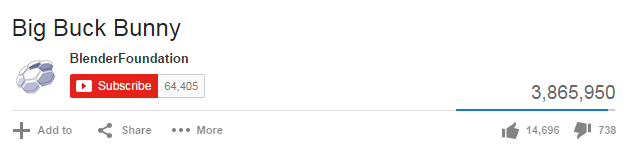
                <p class="break">When you open your uploaded video in YouTube you will see something like the following figure at the bottom of the video. Browse and open your uploaded video in YouTube. Now look for the share button which is located just below the video as shown in the figure.</p>
                <div><img src="../lib/images/share-panel.png" alt="Share YouTube Videos" /></div>
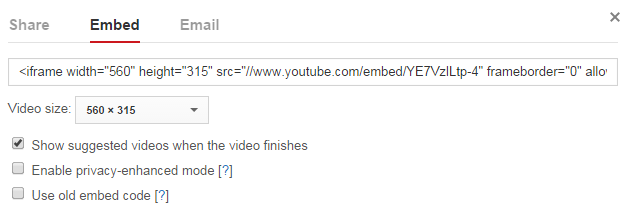
                <p class="break">When you click the share button, a share panel will open displaying some more buttons.  Now click on the Embed button, it will generate the HTML code to directly embed the video into the web pages. Just copy and paste that code into your HTML document where you want to display the video and you're all set. By default video embedded inside an iframe.</p>
                <div><img src="../lib/images/embed-code.png" alt="Share YouTube Videos" /></div>
                <p>You can further customize this embed code such as changing the video size by selecting the customization option given just below the embed-code input box.</p>
				<p>The following example simply embeds a video from the YouTube. Let's try it out:</p>
                <!--Code box-->
                <div class="example">
                    <div class="codebox">
                        <div class="codebox-title"><h4>Example</h4><a href="../codelab.php%3Ftopic=html5&amp;file=embed-youtube-video.html" target="_blank" class="try-btn" title="Try this code using online Editor">Try this code <span>&raquo;</span></a></div>
                        <pre class="syntax-highlighter line-numbers"><code class="language-markup">&lt;!DOCTYPE html&gt;
&lt;html lang="en"&gt;
&lt;head&gt;
    &lt;meta charset="utf-8"&gt;
    &lt;title&gt;YouTube Video&lt;/title&gt;
&lt;/head&gt;
&lt;body&gt;
    &lt;iframe width="560" height="315" src="//www.youtube.com/embed/YE7VzlLtp-4" frameborder="0" allowfullscreen&gt;&lt;/iframe&gt;
&lt;/body&gt;
&lt;/html&gt;</code></pre>
                    </div>
                </div>
                <!--End:Code box-->
				<!--Bottom Navigation-->
                <div class="bottom-link clearfix">
                    <a href="html5-audio.php.html" class="previous-page-bottom">Previous Page</a>
                    <a href="html5-web-storage.php.html" class="next-page-bottom">Next Page</a>
                </div>
                <!--End:Bottom Navigation-->
          		<!-- InstanceEndEditable -->
                <div class="bottom-ad clearfix">

     <div class="ad-label">Advertisements</div>

     <!--Rectangle Left-->
     <div class="rectangle-left fl">
          <script async src="https://pagead2.googlesyndication.com/pagead/js/adsbygoogle.js"></script>
          <!-- Large Rectangle Left -->
          <ins class="adsbygoogle"
               style="display:inline-block;width:336px;height:280px"
               data-ad-client="ca-pub-9107540490929984"
               data-ad-slot="8162953958"></ins>
          <script>
          (adsbygoogle = window.adsbygoogle || []).push({});
          </script>
     </div>
     <!--End:Rectangle Left-->

     <!--Rectangle Right-->
     <div class="rectangle-right fr">
          <script async src="https://pagead2.googlesyndication.com/pagead/js/adsbygoogle.js"></script>
          <!-- Large Rectangle Right -->
          <ins class="adsbygoogle"
               style="display:inline-block;width:336px;height:280px"
               data-ad-client="ca-pub-9107540490929984"
               data-ad-slot="3324015654"></ins>
          <script>
          (adsbygoogle = window.adsbygoogle || []).push({});
          </script>
     </div>
     <!--End:Rectangle Right-->

</div>

            </div>
            <!--End:Text Content-->
            <!--Feedback Form-->
			<div class="snippets">
	<a href="../snippets/gallery.php.html" target="_blank"><img src="../lib/images/bootstrap-code-snippets.png" alt="Bootstrap UI Design Templates" /></a>
</div>            <!--End:Feedback Form-->
        </div>        
        <div class="rightcolumn">
            <div class="sidebar">
    
    <div class="ad-label">Advertisements</div>

    <div class="skyscraper primary">
        <script async src="https://pagead2.googlesyndication.com/pagead/js/adsbygoogle.js"></script>
        <!-- Premium Skyscraper -->
        <ins class="adsbygoogle"
            style="display:inline-block;width:160px;height:600px"
            data-ad-client="ca-pub-9107540490929984"
            data-ad-slot="4376141825"></ins>
        <script>
        (adsbygoogle = window.adsbygoogle || []).push({});
        </script>
    </div>

    <div class="skyscraper">
     <script async src="https://pagead2.googlesyndication.com/pagead/js/adsbygoogle.js"></script>
     <!-- Bottom Skyscraper -->
     <ins class="adsbygoogle"
          style="display:inline-block;width:160px;height:600px"
          data-ad-client="ca-pub-9107540490929984"
          data-ad-slot="3387984471"></ins>
     <script>
     (adsbygoogle = window.adsbygoogle || []).push({});
     </script>
</div>
</div>        </div>
    </div>
    <!--Footer-->
	<!--Footer-->
<div class="footer">
    <div class="appeal">
        <div class="wrapper">
            <p>Is this website helpful to you? Please give us a
            <a href="../like.php.html" onclick="javascript:window.open(this.href, '', 'menubar=no,toolbar=no,resizable=yes,scrollbars=yes,height=250,width=600,top=150, left='+((screen.width/2)-300));return false;">like</a>,
            or share your <a href="../contact-us.php.html" target="_blank">feedback</a><em> to help us improve</em>.
            Connect with us on <a href="https://www.facebook.com/tutorialrepublic" target="_blank">Facebook</a> and <a href="https://twitter.com/tutrepublic" target="_blank">Twitter</a> for the latest updates.</p>               
        </div>
    </div>
    <div class="footer-inner">
        <div class="wrapper clearfix">                
            <div class="link-box">
                <h4>About Us</h4>
                <div class="clearfix">
                    <a href="../about-us.php.html">Our Story</a>                    
                    <a href="../terms-of-use.php.html">Terms of Use</a>
                    <a href="../privacy-policy.php.html">Privacy Policy</a>                    
                </div>
            </div>
            <div class="link-box">
                <h4>Contact</h4>
                <div class="clearfix">
                    <a href="../contact-us.php.html">Contact Us</a>                    
                    <a href="../contact-us.php.html" target="_blank">Report Error</a>
                    <a href="../advertise-with-us.php.html">Advertise</a>                    
                </div>
            </div>
            <div class="tool-box">
                <h4>Interactive Tools</h4>
                <div class="tools-list clearfix" id="tools">
                    <a href="../font-awesome-icons-classes.php.html" target="_blank">Font Awesome Icon Search Utility</a>
                    <a href="../html-formatter.php.html" target="_blank">HTML Formatter</a>
                    <a href="../faq/what-is-the-maximum-length-of-title-and-meta-description-tag.php.html">Title &amp; Meta Length Calculator</a>
                    <a href="../html-reference/html-color-picker.php.html">HTML Color Picker</a>
                    <a href="../twitter-bootstrap-button-generator.php.html" target="_blank">Bootstrap Button Generator</a>
                    <a href="../codelab.php%3Ftopic=sql&amp;file=select-all.html" target="_blank">SQL Playground</a>
                    <a href="../bootstrap-icons-classes.php.html" target="_blank">Bootstrap Icon Finder</a>
                    <a href="../codelab.php%3Ftopic=html&amp;file=hello-world.html" target="_blank">HTML Editor</a>
                </div>
            </div>
            <div class="footer-logo">
                <p><img src="../lib/images/logo.svg" alt="TutorialRepublic" /><p>
					<div>
						<a href="https://www.buymeacoffee.com/tutrepublic" class="bmc-btn" rel="nofollow" target="_blank">
    						<img src="../lib/images/bmc-btn.png" alt="BMC" />
						</a>
					</div>
            </div>
        </div>
    </div>           
        <div class="bottom-strip">
        <div class="wrapper">
            <div class="notice">Copyright &copy; 2022 Tutorial Republic. All Rights Reserved.</div>
            <div class="social-media">
                <em>Share This:</em>
                <a href="https://facebook.com/sharer.php?u=https://www.tutorialrepublic.com%2Fhtml-tutorial%2Fhtml5-video.php" onclick="javascript:window.open(this.href, '', 'menubar=no,toolbar=no,resizable=yes,scrollbars=yes,height=300,width=600,top=150, left='+((screen.width/2)-300));return false;" title="Facebook"><i class="icon-facebook"></i></a>
                <a href="html5-video.php.html#" id="tweet-btn" onclick="javascript:window.open(this.href, '', 'menubar=no,toolbar=no,resizable=yes,scrollbars=yes,height=300,width=600,top=150, left='+((screen.width/2)-300));return false;" title="Twitter"><i class="icon-twitter"></i></a>
                <a href="html5-video.php.html#" id="email-btn" onclick="javascript:window.open(this.href, '', 'menubar=no,toolbar=no,resizable=yes,scrollbars=yes,height=300,width=600,top=150, left='+((screen.width/2)-300));return false;" rel="noreferrer" title="Gmail"><i class="icon-mail"></i></a>
            </div>
        </div>            
    </div>
    <script>
        var title = document.title.replace('- Tutorial Republic', '');
        document.getElementById('tweet-btn').href = 'https://twitter.com/share?text=' + title + '- &url=https://www.tutorialrepublic.com%2Fhtml-tutorial%2Fhtml5-video.php';
        document.getElementById('email-btn').href = 'https://mail.google.com/mail/?view=cm&fs=1&su=' + title + '&body=https://www.tutorialrepublic.com%2Fhtml-tutorial%2Fhtml5-video.php';
    </script>
</div>
<!--End:Footer-->
    
<div class="backdrop mobile-only"></div>

<!-- TutorialRepublic base script -->
<script>
// Adding CSS files
[	
	'/lib/styles/legacy/extended-1.1.css',
	'/lib/icomoon/style.css'
].forEach(function(href) {
	var link = document.createElement('link');
	link.rel = 'stylesheet';
	link.href = href;
	(document.getElementsByTagName('head')[0]).appendChild(link);
});

// Adding JS files
[
	'https://ajax.googleapis.com/ajax/libs/jquery/2.2.4/jquery.min.js',
	'/lib/js/prism.js',
	'/lib/js/default-1.3.js'
].forEach(function(src) {
	var script = document.createElement('script');
	script.async = false; // important
	script.src = src;
	(document.getElementsByTagName('body')[0]).appendChild(script);
});
</script>


    <!--End:Footer-->
</body>
<!-- InstanceEnd --></html>