<!DOCTYPE html>
<html lang="en"><!-- InstanceBegin template="/Templates/html.dwt.php" codeOutsideHTMLIsLocked="false" -->
<head>
	<!-- InstanceBeginEditable name="doctitle" -->
    <title>HTML Tags Vs Elements - Tutorial Republic</title>
    <meta name="description" content="An HTML element represents an individual component of an HTML document - For example, the title element represents the title of the document." />
    <!-- InstanceEndEditable -->
    	<meta charset="UTF-8" />
<meta name="viewport" content="width=device-width, initial-scale=1" />
<meta property="fb:admins" content="100001054961582" />
<meta property="fb:app_id" content="1404574483159557" />
<meta property="og:image" content="/lib/images/signature.png" />
<link rel="shortcut icon" type="image/x-icon" href="../favicon.png" />
<style>
html,body,h1,h2,h3,h4,h5,h6,p,blockquote,pre,img{margin:0;padding:0;border:0;font-size:100%;font:inherit;vertical-align:baseline}
html,body{min-height:100%}
p{margin:0 0 12px}
ol,ul{margin:0 0 12px}
a,a:active,a:visited{outline:none;color:#1db79f;text-decoration:none}
a img{border:none;outline:none}
p code,table td:last-child code,.content ul li code,code.mark{padding:2px 4px;color:#333;background-color:#f1f1f1;border-radius:4px}
a code{color:inherit;background:none;padding:0}
table{border-collapse:collapse;border-spacing:0}
table td{vertical-align:top}
body{min-width:1300px;color:#414141;background:#fafafa;font-family:-apple-system,BlinkMacSystemFont,"Segoe UI","Helvetica Neue",sans-serif;font-size:17px;line-height:1.7}
input,select,textarea,button,div,span,a{box-sizing:border-box}
h1,h2,h3,h4{color:#262626;margin:20px 0 10px;line-height:1.5;font-weight:600}
h1{font-size:34px;margin-top:17px}
h2{font-size:28px}
h3{font-size:22px}
.space{margin-bottom:25px!important}
.break{margin-bottom:15px!important}
.text-center{text-align:center!important}
.scroll{height:195px;overflow-y:scroll}
.scroll.large{height:245px}
.scroll.xlarge{height:290px}
.scroll.xxlarge{height:340px}
sup{font-size:13px}
h1 sup{background:#ec0000;border-radius:3px;padding:5px 10px;font-size:15px;color:#fff;position:relative;top:5px}
.leaderboard{padding-top:14px;position:relative;height:105px;overflow:hidden}
.intro-image img{display:block;padding:10px 0 25px;max-width:100%}
.clearfix::after{content:".";display:block;height:0;clear:both;visibility:hidden}
code,.code,.syntax,.green-box,.sky-box,.gray-box,.pink-box,.red-box,.at-rule,.codebox pre,.console-output,.command{font-size:16px;font-family:Consolas,Monaco,Courier,monospace}
.console-output{margin:15px 0}
.command{background:#f2f2f2;padding:16px 18px;margin:15px 0 25px;border-radius:3px}
hr{border:none;border-bottom:1px solid #e7e9ed;height:1px;margin:30px 0}
.summary,.topic{border:1px solid #eaeaea;border-width:1px 0;margin:20px 0;padding:10px 0;color:#8e9aa6;line-height:1.5}
h2.section-title span{display:inline-block;border-bottom:4px solid #c9d7e0;padding:0 50px 12px 0}
.wrapper{width:1300px;padding:0 15px;margin:0 auto}
.header{background:#23384e;padding:16px 0}
input.search{background:#fff;border:0 none;color:#807E7E;float:left;height:38px;line-height:26px;font-size:14px;margin:0 0 0 12px;outline:medium none;padding:6px 14px;width:500px;border-radius:2px;box-shadow:0 0 1px rgba(0,0,0,0.6);font-family:inherit}
.search-btn{color:rgba(0,0,0,.6);background:#ebebeb;border:none;outline:none;cursor:pointer;float:left;height:38px;line-height:46px;width:44px;display:block;margin-left:-2px;border-radius:0 2px 2px 0;box-shadow:0 0 1px rgba(0,0,0,0.7)}
.logo{width:304px}
.logo img{height:44px;margin:-3px 0;display:block}
.site-search{float:left;margin-left:100px}
.menu{background-color:#f5f5f5;box-shadow:0 1px 1px rgba(0,0,0,.15);position:relative;z-index:9}
.menu a{color:#666;display:inline-block;padding:0 10px;text-decoration:none;font-size:14px;font-weight:600;height:48px;line-height:48px}
.menu a:first-child{margin-left:-10px}
.menu a.tool-link{float:right;display:block;border-radius:30px;line-height:28px;position:relative;height:auto;top:9px;padding:0 12px;color:#1ebba3;border:1px double #1ebba3}
.fl,.logo{float:left}
.leftcolumn{width:240px;float:left;font-size:16px;color:#4f4f4f}
.centercolumn{width:850px;float:left}
.rightcolumn{width:180px;float:left}
.content{background:#fff;padding:15px 40px 20px;border:1px solid #dedede;border-top:none;border-radius:1px}
.sidebar{width:160px;float:left;padding-top:28px;margin-left:20px;position:relative}
.leftcolumn .segment{margin:16px 0 12px;position:relative;font-size:18px;font-weight:600;line-height:normal}
.leftcolumn a{color:#4f4f4f;font-size:16px;line-height:26px;display:block;border-bottom:1px solid transparent}
.leftcolumn ul{list-style:none;padding:0;margin:0}
.segment,.chapters,.chapters a{float:left;clear:both}
h1 code,h2 code,h3 code{font:inherit}
.color-box{margin:15px 0;padding-left:20px}
.note-box,.warning-box,.tip-box{padding:8px 8px 3px 26px}
.info-tab{float:left;margin-left:-23px}
.content ul li{margin-top:7px}
.extra{padding-top:5px}
.green-box,.sky-box,.gray-box,.red-box,.pink-box{color:#000;margin-top:15px;padding:10px;background-color:#f6f8fa;border:1px solid #d7e2ec}
.example{background:#f4f5f6;padding:3px;margin:15px 0}
.codebox{background:#fff;border:1px solid #ddd}
.codebox-title{height:41px;padding-left:12px;border-bottom:1px solid #ddd;background:#f5f5f5}
.codebox-title h4{margin:0;font-size:18px;line-height:40px;float:left;font-weight:600}
a.try-btn,a.download-btn{width:140px;height:40px;color:#333;font-size:15px;line-height:41px;font-weight:600;text-align:center;text-decoration:none;float:right;display:block;border-left:1px solid #ddd;background:rgba(27,31,35,0.08);box-sizing:border-box;font-family:Arial,sans-serif}
a.try-btn span{font-size:18px;line-height:normal}
.hide,.code-style,.box-size,.bottom-link,.footer,.code-style,.snippets,.report-error,.badge,.social,.ad-label,.mobile-only,ul.tree-menu li ul{display:none}
.skyscraper{width:160px;height:600px;overflow:hidden;margin-bottom:20px;background:#ebecf0}
.bottom-ad{margin-top:46px;padding:24px;position:relative;background:url(../lib/images/smooth-line.png) no-repeat center #f9f9f9}
.rectangle-left,.rectangle-right{min-width:336px;min-height:280px;overflow:hidden}
.fr,a.previous-page,a.next-page,.rectangle-right,.topic-nav{float:right}
a.previous-page,a.next-page{width:32px;height:32px;line-height:30px}
.shadow{background:#F7F8F9;padding:3px;margin:10px 0}
.syntax{color:#2f4959;padding:13px 18px;background:#F9F9FA;border:1px solid #ddd;font-size:15px}
code[class*="language-"],pre[class*="language-"]{color:#000;background:none;font-family:Consolas,Monaco,'Andale Mono','Ubuntu Mono',monospace;text-align:left;white-space:pre;word-break:normal;word-wrap:normal;line-height:1.5;tab-size:4;hyphens:none}
pre[class*="language-"]{position:relative;margin:.5em 0;overflow:visible;padding:0}
pre[class*="language-"]>code{position:relative;border-left:10px solid #358ccb;box-shadow:-1px 0 0 0 #358ccb,0 0 0 1px #dfdfdf;background-color:#fdfdfd;background-image:linear-gradient(transparent 50%,rgba(69,142,209,0.04) 50%);background-size:3em 3em;background-origin:content-box;background-attachment:local}
code[class*="language"]{max-height:inherit;height:inherit;padding:0 1em;display:block;overflow:auto}
:not(pre) > code[class*="language-"]{position:relative;padding:.2em;border-radius:.3em;color:#c92c2c;border:1px solid rgba(0,0,0,0.1);display:inline;white-space:normal}
pre[class*="language-"].line-numbers{padding-left:0}
pre[class*="language-"].line-numbers code{padding-left:3.8em}
pre[class*="language-"].line-numbers .line-numbers-rows{left:0}
pre[class*="language-"][data-line]{padding-top:0;padding-bottom:0;padding-left:0}
pre[data-line] code{position:relative;padding-left:4em}
pre .line-highlight{margin-top:0}
pre.line-numbers{position:relative;padding-left:3.8em;counter-reset:linenumber;white-space:pre-wrap!important}
pre.line-numbers > code{position:relative;white-space:inherit}
.line-numbers-rows,.codebox pre.inactive{display:none}
.codebox pre.syntax-highlighter{margin:0;padding:0;overflow:auto}
pre.line-numbers .line-numbers-rows{border-right:3px solid #6CE26C}
.codebox pre.syntax-highlighter > code{box-shadow:none!important;padding-left:3.8em;background-image:linear-gradient(transparent 50%,#F8F8F8 50%);font-family:Consolas,Monaco,'Andale Mono','Ubuntu Mono',monospace!important;font-size:16px;line-height:1.5;overflow-wrap:break-word}
.codebox pre.syntax-highlighter,.codebox pre.syntax-highlighter code{border:none;width:100%;box-sizing:border-box}
pre.line-numbers code,pre.line-numbers .line-numbers-rows{padding-top:2px;padding-bottom:2px}
.preview-box{padding:15px;text-align:center;cursor:pointer;overflow:hidden;background:#FFF;border:1px solid #e6e6e6}
.preview-box a,.preview-box img{display:block;margin:0 auto}
.download-box{text-align:center;padding:20px 0;margin:20px 0 10px}
.output-box{border-color:#d4d4d4;border-style:solid;border-width:1px 0;padding:5px 15px;overflow:hidden;background:#fff;margin:10px 0}
.demo-box{margin-top:15px}
.subhead{border-bottom:3px solid #DCE3EB;margin-bottom:15px;padding-bottom:10px}
table.data,table.description{width:100%;font-size:92%}
table.data th{color:#000;padding:8px 7px;text-align:left;font-size:15px;background:#F8F8F8}
table.data td{color:#484848;padding:5px 7px;background:#fff}
table.data th,table.data td{vertical-align:top;border:1px solid #DCE3EB}
table.data tr.section th,table.data td.section{font-size:15px;background:#f0f4f7}
table.description th{width:150px}
table.no-wrap tr td:first-child{white-space:nowrap}
.topic-nav{padding-right:5px;color:#d0d0d0}
.topic-nav a{padding:0 15px;margin:0 0 0 5px;position:relative;display:inline-block}
.topic-nav a::after{font-size:24px;position:absolute;line-height:22px}
.topic-nav a:first-child{margin:0 5px 0 0}
.topic-nav a:first-child::after{content:'\00AB';left:-5px}
.topic-nav a:last-child::after{content:'\00BB';right:-5px}
@media screen and (max-width: 1280px) {
body{min-width:1260px}
.wrapper{width:1260px}
.leftcolumn{width:230px}
.centercolumn{width:820px}
.preview-box img{max-width:100%;height:auto}
}
@media screen and (max-width: 800px) {
body{min-width:100%;max-width:100%;padding-top:46px}
.wrapper{width:100%;padding:0}
.header{height:46px;padding:5px 0;position:fixed;top:0;left:0;right:0;width:100%;z-index:99}
.logo{width:auto;display:block;padding:6px 0 0 60px;position:absolute;left:0;z-index:100}
.logo img{height:30px}
.menu{width:100%;padding-left:12px;padding-right:12px;overflow-x:auto;white-space:nowrap}
.centercolumn{width:100%;float:none}
.content{padding:10px;border-width:0 0 1px 0}
.content img{max-width:100%;height:auto}
.skyscraper{display:inline-block}
.shadow,.example,.console-output,.content pre{max-width:100%;overflow-x:auto}
.codebox-title{position:relative}
.codebox.multi-style-mode pre{padding-top:7px;margin-top:36px;border-top:1px solid #ddd}
.bottom-ad{height:auto;background:none;padding:30px 0 0;margin:40px 0 0;text-align:center;position:relative}
.rectangle-left,.rectangle-right{float:none;display:inline-block;margin:10px auto;background:#EDEEF2}
.leftcolumn,.footer,.social,.site-search,.code-style,.menu a.tool-link,.backdrop{display:none}
.summary,.topic{padding:5px 0;margin:10px 0}
.leftcolumn,.centercolumn,.rightcolumn,.sidebar{float:none}
.header,.menu,.centercolumn,.footer,.appeal-text{width:100%}
a.try-btn,a.download-btn{width:130px}
.native-unit{margin-bottom:30px}
.rightcolumn,.sidebar{margin: 25px auto 0}
.overview{padding-right:0}
.scroll-pane{overflow-x:auto}
table.data{min-width:480px}
table.data pre{display:inline;white-space:normal}
table tr th,table tr td{width:auto!important}
.preview-box{padding:6px}
.leaderboard{margin:20px 0}
h1{font-size:30px}
h2{font-size:24px}
h3{font-size:20px}
.codebox pre.syntax-highlighter{overflow-x:auto}
.codebox pre.syntax-highlighter > code{min-width:614px;height:auto;overflow-x:hidden}
}
@media screen and (min-width: 801px) {
.site-search,.leftcolumn,.social{display:block!important}
.backdrop{display:none!important}
.hide-scroll{overflow-x:hidden!important}
}
.menu a.old-version{height:21px;font-size:13px;line-height:17px;border:1px double;border-radius:40px;margin-right:10px}</style>
<script>
    (function(){
        var bsa_optimize=document.createElement('script');
        bsa_optimize.type='text/javascript';
        bsa_optimize.async=true;
        bsa_optimize.src='https://cdn4.buysellads.net/pub/tutorialrepublic.js';
        (document.getElementsByTagName('head')[0]||document.getElementsByTagName('body')[0]).appendChild(bsa_optimize);
    })();
</script>
    
    <!-- InstanceBeginEditable name="head" -->
    <!-- InstanceEndEditable -->
    
	<script async src="https://www.googletagmanager.com/gtag/js?id=UA-40117907-1"></script>
<script>
  window.dataLayer = window.dataLayer || [];
  function gtag(){dataLayer.push(arguments);}
  gtag('js', new Date());

  gtag('config', 'UA-40117907-1');
</script></head>
<body>
    <!--Header-->
    
<div class="header">
    <div class="wrapper clearfix">
        <button type="button" class="open-menu mobile-only"><i class="icon-menu"></i></button>
        <div class="logo">
            <a href="../index.html"><img src="../lib/images/logo.svg" alt="TutorialRepublic" /></a>
        </div>
        <div class="site-search">
            <form action="https://www.google.com/search" method="get" target="_blank" class="clearfix">
                <input type="hidden" value="www.tutorialrepublic.com" name="sitesearch" />
                <input type="text" name="q" placeholder="Search topics, tutorials, questions and answers..." id="searchInput" class="search" />
                <button type="submit" class="search-btn"><span class="icon-search"></span></button>
            </form>
        </div>
        <div class="social">                
            <a href="https://www.facebook.com/tutorialrepublic" target="_blank" title="Join us on Facebook"><i class="icon-facebook"></i></a>
            <a href="https://twitter.com/tutrepublic" target="_blank" title="Follow us on Twitter"><i class="icon-twitter"></i></a>
            <a href="../contact-us.php.html" target="_blank" title="Send us an Email"><i class="icon-mail"></i></a>
        </div>
        <button type="button" class="open-search mobile-only">
            <i class="icon-search"></i>
        </button>
    </div>    
</div>
<div class="menu">
    <div class="wrapper">
        <a href="../index.html" title="Home Page">HOME</a>
        <a href="html-introduction.php.html" title="HTML Tutorial">HTML5</a>            
        <a href="../css-tutorial/index.html" title="CSS Tutorial">CSS3</a>
        <a href="../javascript-tutorial/index.html" title="JavaScript Tutorial">JAVASCRIPT</a>
        <a href="../jquery-tutorial/index.html" title="jQuery Tutorial">JQUERY</a>
        <a href="../twitter-bootstrap-tutorial/index.html" title="Bootstrap 5 Tutorial">BOOTSTRAP5</a>
		<a href="https://www.tutorialrepublic.com/twitter-bootstrap-4-tutorial/" class="old-version" title="Bootstrap 4.6 Tutorial">v4.6</a>
        <a href="../php-tutorial/index.html" title="PHP Tutorial">PHP7</a> 
        <a href="../sql-tutorial/index.html" title="SQL Tutorial">SQL</a>
        <a href="../references.php.html" title="Web References">REFERENCES</a>
        <a href="../practice-examples.php.html" title="Practice Examples and Demos">EXAMPLES</a>
        <a href="../faq.php.html" title="Frequently Asked Questions and Answers">FAQ</a>
        <a href="../snippets/gallery.php.html" title="Bootstrap Code Snippets" target="_blank">SNIPPETS</a>
        <a href="../codelab.php.html" class="tool-link" target="_blank">Online HTML Editor</a>
    </div>        
</div>    <!--End:Header-->
    <div class="wrapper clearfix">
        <div class="leftcolumn" id="myNav">
		
        <div class="segment"><span>HTML</span> BASIC</div>
<div class="chapters">
    <a href="html-introduction.php.html">HTML Introduction</a>
    <a href="html-get-started.php.html">HTML Getting Started</a>
    <a href="html-elements.php.html">HTML Elements</a>
    <a href="html-attributes.php.html">HTML Attributes</a>
    <a href="html-headings.php.html">HTML Headings</a>
    <a href="html-paragraphs.php.html">HTML Paragraphs</a>
    <a href="html-links.php.html">HTML Links</a>
    <a href="html-text-formatting.php.html">HTML Text Formatting</a>
    <a href="html-styles.php.html">HTML Styles</a>
    <a href="html-images.php.html">HTML Images</a>
    <a href="html-tables.php.html">HTML Tables</a>
    <a href="html-lists.php.html">HTML Lists</a>
    <a href="html-forms.php.html">HTML Forms</a>
    <a href="html-iframes.php.html">HTML Iframes</a>
</div>
<div class="segment"><span>HTML</span> ADVANCED</div>
<div class="chapters">
    <a href="html-doctypes.php.html">HTML Doctypes</a>
    <a href="html-layout.php.html">HTML Layout</a>
    <a href="html-head.php.html">HTML Head</a>
    <a href="html-meta.php.html">HTML Meta</a>
    <a href="html-scripts.php.html">HTML Scripts</a>
    <a href="html-entities.php.html">HTML Entities</a>
    <a href="html-url.php.html">HTML URL</a>
    <a href="html-url-encode.php.html">HTML URL Encode</a>
    <a href="html-validation.php.html">HTML Validation</a>
</div>
<div class="segment"><span>HTML5</span> FEATURES</div>
<div class="chapters">
	<a href="html5-new-input-types.php.html">HTML5 New Input Types</a>
    <a href="html5-canvas.php.html">HTML5 Canvas</a>
    <a href="html5-svg.php.html">HTML5 SVG</a>
    <a href="html5-audio.php.html">HTML5 Audio</a>
    <a href="html5-video.php.html">HTML5 Video</a>
    <a href="html5-web-storage.php.html">HTML5 Web Storage</a>
    <a href="html5-application-cache.php.html">HTML5 Application Cache</a>
    <a href="html5-web-workers.php.html">HTML5 Web Workers</a>
    <a href="html5-server-sent-events.php.html">HTML5 SSE</a>
    <a href="html5-geolocation.php.html">HTML5 Geolocation</a>
    <a href="html5-drag-and-drop.php.html">HTML5 Drag &amp; Drop</a>
</div>
<div class="segment"><span>HTML5</span> EXAMPLES</div>
<div class="chapters">
    <a href="../html-examples.php.html">HTML5 Practice Examples</a>
	<a href="../faq.php.html#html-css">HTML5 FAQ's Answers</a>
</div>
<div class="segment"><span>HTML5</span> REFERENCE</div>
<div class="chapters">
    <a href="../html-reference/html-tag-list.php.html">HTML5 Tags/Elements</a>
	<a href="../html-reference/html-common-attributes.php.html">HTML5 Global Attributes</a>
    <a href="../html-reference/html5-event-attributes.php.html">HTML5 Event Attributes</a>
    <a href="../html-reference/html-language-codes.php.html">HTML5 Language Codes</a>
    <a href="../html-reference/html-character-entities.php.html">HTML5 Character Entities</a>
    <a href="../html-reference/http-status-codes.php.html">HTTP Status Codes</a>
	<a href="../html-reference/html-color-picker.php.html">HTML5 Color Picker</a>
	<a href="../references.php.html" class="more">More references</a>
</div>        
                </div>
        <div class="centercolumn">
            <!--Text Content-->
            <div class="content">
                <div class="leaderboard">

    <div class="ad-label">Advertisements</div>

    <div class="ad-container">
        <script async src="https://pagead2.googlesyndication.com/pagead/js/adsbygoogle.js"></script>
        <!-- Responsive Leaderboard -->
        <ins class="adsbygoogle"
                style="display:block;max-width:728px;width:100%;height:90px"
                data-ad-client="ca-pub-9107540490929984"
                data-ad-slot="4302666817"></ins>
        <script>
        (adsbygoogle = window.adsbygoogle || []).push({});
        </script>
    </div>

    <!-- ABR Leaderboard -->
    <div id="bsa-zone_1579648332258-0_123456"></div>

</div>                <!-- InstanceBeginEditable name="main_content" -->
                <a href="html-get-started.php.html" class="previous-page" title="Go to Previous Page"></a>
                <a href="html-attributes.php.html" class="next-page" title="Go to Next Page"></a>
                <h1>HTML <span>Elements</span></h1>
                <p class="summary">In this tutorial you will learn about HTML tags and elements.</p>
                <h2>HTML Element Syntax</h2>
                <p>An HTML element is an individual component of an HTML document. It represents semantics, or meaning. For example, the <code>title</code> element represents the title of the document.</p>
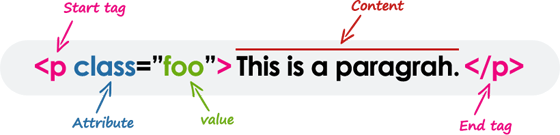
                <p class="space">Most HTML elements are written with a <em>start tag</em> (or opening tag) and an <em>end tag</em> (or closing tag), with content in between. Elements can also contain attributes that defines its additional properties. For example, a paragraph, which is represented by the <code>p</code> element, would be written as:</p>
                <div class="space"><img width="560" src="../lib/images/html-element.png" alt="HTML Element Syntax Illustration"></div>
                <p>We will learn about the HTML attributes in the <a href="html-attributes.php.html">next chapter</a>.</p>
                <!--Note box-->
                <div class="color-box">
                    <div class="shadow">
                        <div class="info-tab note-icon" title="Important Notes"><i></i></div>
                        <div class="note-box">
                            <p><strong>Note:</strong> All elements don't require the end tag or closing tag to be present. These are referred as <em>empty elements</em>, <em>self-closing elements</em> or <em>void elements</em>.</p>
                        </div>
                    </div>
                </div>
                <!--End:Note box-->
                <hr />
                <h2>HTML Tags Vs Elements</h2>
                <p>Technically, an HTML element is the collection of start tag, its attributes, an end tag and everything in between. On the other hand an HTML tag (either opening or closing) is used to mark the start or end of an element, as you can see in the above illustration.</p>
                <p>However, in common usage the terms HTML element and HTML tag are interchangeable i.e. a tag is an element is a tag. For simplicity's sake of this website, the terms "tag" and "element" are used to mean the same thing &mdash; as it will define something on your web page.</p>
                <hr />
                <h2>Case Insensitivity in HTML Tags and Attributes</h2>
                <p>In HTML, tag and attribute names are not case-sensitive (but most attribute values are case-sensitive). It means the tag <code>&lt;P&gt;</code>, and the tag <code>&lt;p&gt;</code> defines the same thing in HTML which is a paragraph.</p>
                <p>But in <a href="../xhtml-tutorial.php.html">XHTML</a> they are case-sensitive and the tag <code>&lt;P&gt;</code> is different from the tag <code>&lt;p&gt;</code>.</p>
                <!--Code box-->
                <div class="example">
                    <div class="codebox">
                        <div class="codebox-title"><h4>Example</h4><a href="../codelab.php%3Ftopic=html&amp;file=case-insensitivity.html" target="_blank" class="try-btn" title="Try this code using online Editor">Try this code <span>&raquo;</span></a></div>
                        <pre class="syntax-highlighter line-numbers"><code class="language-markup">&lt;p&gt;This is a paragraph.&lt;/p&gt;
&lt;P&gt;This is also a valid paragraph.&lt;/P&gt;</code></pre>
                    </div>
                </div>
                <!--End:Code box-->
                <!--Tip Box-->
                <div class="color-box">
                    <div class="shadow">
                        <div class="info-tab tip-icon" title="Useful Tips"><i></i></div>
                        <div class="tip-box">
                            <p><strong>Tip:</strong> We recommend using lowercase for tag and attributing names in HTML, since by doing this you can make your document more compliant for future upgrades.</p>
                        </div>
                    </div>
                </div>
                <!--End:Tip Box-->
                <hr />
                <h2 id="empty-elements">Empty HTML Elements</h2>
                <p>Empty elements (also called self-closing or void elements) are not container tags &mdash; that means, you can not write <code>&lt;hr&gt;<i>some content</i>&lt;/hr&gt;</code> or <code>&lt;br&gt;<i>some content</i>&lt;/br&gt;</code>.</p>
                <p>A typical example of an empty element, is the <code>&lt;br&gt;</code> element, which represents a line break. Some other common empty elements are <code>&lt;img&gt;</code>, <code>&lt;input&gt;</code>, <code>&lt;link&gt;</code>, <code>&lt;meta&gt;</code>, <code>&lt;hr&gt;</code>, etc.</p>
                <!--Code box-->
                <div class="example">
                    <div class="codebox">
                        <div class="codebox-title"><h4>Example</h4><a href="../codelab.php%3Ftopic=html&amp;file=empty-elements.html" target="_blank" class="try-btn" title="Try this code using online Editor">Try this code <span>&raquo;</span></a></div>
                        <pre class="syntax-highlighter line-numbers"><code class="language-markup">&lt;p&gt;This paragraph contains &lt;br&gt; a line break.&lt;/p&gt;
&lt;img src="images/sky.jpg" alt="Cloudy Sky"&gt;
&lt;input type="text" name="username"&gt;</code></pre>
                    </div>
                </div>
                <!--End:Code box-->
                <!--Note box-->
                <div class="color-box">
                    <div class="shadow">
                        <div class="info-tab note-icon" title="Important Notes"><i></i></div>
                        <div class="note-box">
                            <p><strong>Note:</strong> In HTML, a self-closing element is written simply as <code><a href="../html-reference/html-br-tag.php.html">&lt;br&gt;</a></code>. In XHTML, a self-closing element requires a space and a trailing slash, such as <code>&lt;br /&gt;</code>.</p>
                        </div>
                    </div>
                </div>
                <!--End:Note box-->
                <hr />
                <h2>Nesting HTML Elements</h2>
                <p>Most HTML elements can contain any number of further elements (except <a href="html-elements.php.html#empty-elements">empty elements</a>), which are, in turn, made up of tags, attributes, and content or other elements.</p>
                <p>The following example shows some elements nested inside the <code>&lt;p&gt;</code> element.</p>
                <!--Code box-->
                <div class="example">
                    <div class="codebox">
                        <div class="codebox-title"><h4>Example</h4><a href="../codelab.php%3Ftopic=html&amp;file=nesting-elements.html" target="_blank" class="try-btn" title="Try this code using online Editor">Try this code <span>&raquo;</span></a></div>
                        <pre class="syntax-highlighter line-numbers"><code class="language-markup">&lt;p&gt;Here is some &lt;b&gt;bold&lt;/b&gt; text.&lt;/p&gt;
&lt;p&gt;Here is some &lt;em&gt;emphasized&lt;/em&gt; text.&lt;/p&gt;
&lt;p&gt;Here is some &lt;mark&gt;highlighted&lt;/mark&gt; text.&lt;/p&gt;</code></pre>
                    </div>
                </div>
                <!--End:Code box-->
                <!--Tip Box-->
                <div class="color-box">
                    <div class="shadow">
                        <div class="info-tab tip-icon" title="Useful Tips"><i></i></div>
                        <div class="tip-box">
                            <p><strong>Tip:</strong> Placing one element inside another is called nesting. A nested element, also called a child element, can be a parent element too if other elements are nested within it.</p>
                        </div>
                    </div>
                </div>
                <!--End:Tip Box-->
                <p>HTML tags should be nested in correct order. They must be closed in the inverse order of how they are defined, that means the last tag opened must be closed first.</p>
                <!--Code box-->
                <div class="example">
                    <div class="codebox">
                        <div class="codebox-title"><h4>Example</h4><a href="../codelab.php%3Ftopic=html&amp;file=nesting-order.html" target="_blank" class="try-btn" title="Try this code using online Editor">Try this code <span>&raquo;</span></a></div>
                        <pre class="syntax-highlighter line-numbers"><code class="language-markup">&lt;p&gt;&lt;strong&gt;These tags are nested properly.&lt;/strong&gt;&lt;/p&gt;
&lt;p&gt;&lt;strong&gt;These tags are not nested properly.&lt;/p&gt;&lt;/strong&gt;</code></pre>
                    </div>
                </div>
                <!--End:Code box-->
				<hr />
                <h2>Writing Comments in HTML</h2>
                <p>Comments are usually added with the purpose of making the source code easier to understand. It may help other developer (or you in the future when you edit the source code) to understand what you were trying to do with the HTML. Comments are not displayed in the browser.</p>
                <p>An HTML comment begins with <code>&lt;!--</code>, and ends with <code>--&gt;</code>, as shown in the example below:</p>
                <!--Code box-->
                <div class="example">
                    <div class="codebox">
                            <div class="codebox-title"><h4>Example</h4><a href="../codelab.php%3Ftopic=html&amp;file=comment-syntax.html" target="_blank" class="try-btn" title="Try this code using online Editor">Try this code <span>&raquo;</span></a></div>
                        <pre class="syntax-highlighter line-numbers"><code class="language-markup">&lt;!-- This is an HTML comment --&gt;
&lt;!-- This is a multi-line HTML comment 
     that spans across more than one line --&gt;
&lt;p&gt;This is a normal piece of text.&lt;/p&gt;</code></pre>
                    </div>
                </div>
                <!--End:Code box-->
                <p>You can also comment out part of your HTML code for debugging purpose, as shown here:</p>
                <!--Code box-->
                <div class="example">
                    <div class="codebox">
                            <div class="codebox-title"><h4>Example</h4><a href="../codelab.php%3Ftopic=html&amp;file=commenting-code.html" target="_blank" class="try-btn" title="Try this code using online Editor">Try this code <span>&raquo;</span></a></div>
                        <pre class="syntax-highlighter line-numbers"><code class="language-markup">&lt;!-- Hiding this image for testing
&lt;img src="images/smiley.png" alt="Smiley"&gt;
--&gt;</code></pre>
                    </div>
                </div>
                <!--End:Code box-->
                <hr />
                <h2>HTML Elements Types</h2>
                <p>Elements can be placed in two distinct groups: <em><a href="../css-tutorial/css-visual-formatting.php.html#block-level">block level</a></em> and <em><a href="../css-tutorial/css-visual-formatting.php.html#inline-level">inline level</a></em> elements. The former make up the document's structure, while the latter dress up the contents of a block.</p>
                <p>Also, a block element occupies 100% of the available width and it is rendered with a line break before and after. Whereas, an inline element will take up only as much space as it needs.</p>
                <p>The most commonly used block-level elements are <code>&lt;div&gt;</code>, <code>&lt;p&gt;</code>, <code>&lt;h1&gt;</code> through <code>&lt;h6&gt;</code>, <code>&lt;form&gt;</code>, <code>&lt;ol&gt;</code>, <code>&lt;ul&gt;</code>, <code>&lt;li&gt;</code>, and so on. Whereas, the commonly used inline-level elements are <code>&lt;img&gt;</code>, <code>&lt;a&gt;</code>, <code>&lt;span&gt;</code>, <code>&lt;strong&gt;</code>, <code>&lt;b&gt;</code>, <code>&lt;em&gt;</code>, <code>&lt;i&gt;</code>, <code>&lt;code&gt;</code>, <code>&lt;input&gt;</code>, <code>&lt;button&gt;</code>, etc.</p>
                <p>You will learn about these elements in detail in upcoming chapters.</p>
                <!--Note box-->
                <div class="color-box">
                    <div class="shadow">
                        <div class="info-tab note-icon" title="Important Notes"><i></i></div>
                        <div class="note-box">
                            <p><strong>Note:</strong> The block-level elements should not be placed within inline-level elements. For example, the <code>&lt;p&gt;</code> element should not be placed inside the <code>&lt;b&gt;</code> element.</p>
                        </div>
                    </div>
                </div>
                <!--End:Note box-->
                <!--Bottom Navigation-->
                <div class="bottom-link clearfix">
                    <a href="html-get-started.php.html" class="previous-page-bottom">Previous Page</a>
                    <a href="html-attributes.php.html" class="next-page-bottom">Next Page</a>
                </div>
                <!--End:Bottom Navigation-->
          	    <!-- InstanceEndEditable -->
                <div class="bottom-ad clearfix">

     <div class="ad-label">Advertisements</div>

     <!--Rectangle Left-->
     <div class="rectangle-left fl">
          <script async src="https://pagead2.googlesyndication.com/pagead/js/adsbygoogle.js"></script>
          <!-- Large Rectangle Left -->
          <ins class="adsbygoogle"
               style="display:inline-block;width:336px;height:280px"
               data-ad-client="ca-pub-9107540490929984"
               data-ad-slot="8162953958"></ins>
          <script>
          (adsbygoogle = window.adsbygoogle || []).push({});
          </script>
     </div>
     <!--End:Rectangle Left-->

     <!--Rectangle Right-->
     <div class="rectangle-right fr">
          <script async src="https://pagead2.googlesyndication.com/pagead/js/adsbygoogle.js"></script>
          <!-- Large Rectangle Right -->
          <ins class="adsbygoogle"
               style="display:inline-block;width:336px;height:280px"
               data-ad-client="ca-pub-9107540490929984"
               data-ad-slot="3324015654"></ins>
          <script>
          (adsbygoogle = window.adsbygoogle || []).push({});
          </script>
     </div>
     <!--End:Rectangle Right-->

</div>

            </div>
            <!--End:Text Content-->
            <!--Feedback Form-->
			<div class="snippets">
	<a href="../snippets/gallery.php.html" target="_blank"><img src="../lib/images/bootstrap-code-snippets.png" alt="Bootstrap UI Design Templates" /></a>
</div>            <!--End:Feedback Form-->
        </div>        
        <div class="rightcolumn">
            <div class="sidebar">
    
    <div class="ad-label">Advertisements</div>

    <div class="skyscraper primary">
        <script async src="https://pagead2.googlesyndication.com/pagead/js/adsbygoogle.js"></script>
        <!-- Premium Skyscraper -->
        <ins class="adsbygoogle"
            style="display:inline-block;width:160px;height:600px"
            data-ad-client="ca-pub-9107540490929984"
            data-ad-slot="4376141825"></ins>
        <script>
        (adsbygoogle = window.adsbygoogle || []).push({});
        </script>
    </div>

    <div class="skyscraper">
     <script async src="https://pagead2.googlesyndication.com/pagead/js/adsbygoogle.js"></script>
     <!-- Bottom Skyscraper -->
     <ins class="adsbygoogle"
          style="display:inline-block;width:160px;height:600px"
          data-ad-client="ca-pub-9107540490929984"
          data-ad-slot="3387984471"></ins>
     <script>
     (adsbygoogle = window.adsbygoogle || []).push({});
     </script>
</div>
</div>        </div>
    </div>
    <!--Footer-->
	<!--Footer-->
<div class="footer">
    <div class="appeal">
        <div class="wrapper">
            <p>Is this website helpful to you? Please give us a
            <a href="../like.php.html" onclick="javascript:window.open(this.href, '', 'menubar=no,toolbar=no,resizable=yes,scrollbars=yes,height=250,width=600,top=150, left='+((screen.width/2)-300));return false;">like</a>,
            or share your <a href="../contact-us.php.html" target="_blank">feedback</a><em> to help us improve</em>.
            Connect with us on <a href="https://www.facebook.com/tutorialrepublic" target="_blank">Facebook</a> and <a href="https://twitter.com/tutrepublic" target="_blank">Twitter</a> for the latest updates.</p>               
        </div>
    </div>
    <div class="footer-inner">
        <div class="wrapper clearfix">                
            <div class="link-box">
                <h4>About Us</h4>
                <div class="clearfix">
                    <a href="../about-us.php.html">Our Story</a>                    
                    <a href="../terms-of-use.php.html">Terms of Use</a>
                    <a href="../privacy-policy.php.html">Privacy Policy</a>                    
                </div>
            </div>
            <div class="link-box">
                <h4>Contact</h4>
                <div class="clearfix">
                    <a href="../contact-us.php.html">Contact Us</a>                    
                    <a href="../contact-us.php.html" target="_blank">Report Error</a>
                    <a href="../advertise-with-us.php.html">Advertise</a>                    
                </div>
            </div>
            <div class="tool-box">
                <h4>Interactive Tools</h4>
                <div class="tools-list clearfix" id="tools">
                    <a href="../font-awesome-icons-classes.php.html" target="_blank">Font Awesome Icon Search Utility</a>
                    <a href="../html-formatter.php.html" target="_blank">HTML Formatter</a>
                    <a href="../faq/what-is-the-maximum-length-of-title-and-meta-description-tag.php.html">Title &amp; Meta Length Calculator</a>
                    <a href="../html-reference/html-color-picker.php.html">HTML Color Picker</a>
                    <a href="../twitter-bootstrap-button-generator.php.html" target="_blank">Bootstrap Button Generator</a>
                    <a href="../codelab.php%3Ftopic=sql&amp;file=select-all.html" target="_blank">SQL Playground</a>
                    <a href="../bootstrap-icons-classes.php.html" target="_blank">Bootstrap Icon Finder</a>
                    <a href="../codelab.php%3Ftopic=html&amp;file=hello-world.html" target="_blank">HTML Editor</a>
                </div>
            </div>
            <div class="footer-logo">
                <p><img src="../lib/images/logo.svg" alt="TutorialRepublic" /><p>
					<div>
						<a href="https://www.buymeacoffee.com/tutrepublic" class="bmc-btn" rel="nofollow" target="_blank">
    						<img src="../lib/images/bmc-btn.png" alt="BMC" />
						</a>
					</div>
            </div>
        </div>
    </div>           
        <div class="bottom-strip">
        <div class="wrapper">
            <div class="notice">Copyright &copy; 2022 Tutorial Republic. All Rights Reserved.</div>
            <div class="social-media">
                <em>Share This:</em>
                <a href="https://facebook.com/sharer.php?u=https://www.tutorialrepublic.com%2Fhtml-tutorial%2Fhtml-elements.php" onclick="javascript:window.open(this.href, '', 'menubar=no,toolbar=no,resizable=yes,scrollbars=yes,height=300,width=600,top=150, left='+((screen.width/2)-300));return false;" title="Facebook"><i class="icon-facebook"></i></a>
                <a href="html-elements.php.html#" id="tweet-btn" onclick="javascript:window.open(this.href, '', 'menubar=no,toolbar=no,resizable=yes,scrollbars=yes,height=300,width=600,top=150, left='+((screen.width/2)-300));return false;" title="Twitter"><i class="icon-twitter"></i></a>
                <a href="html-elements.php.html#" id="email-btn" onclick="javascript:window.open(this.href, '', 'menubar=no,toolbar=no,resizable=yes,scrollbars=yes,height=300,width=600,top=150, left='+((screen.width/2)-300));return false;" rel="noreferrer" title="Gmail"><i class="icon-mail"></i></a>
            </div>
        </div>            
    </div>
    <script>
        var title = document.title.replace('- Tutorial Republic', '');
        document.getElementById('tweet-btn').href = 'https://twitter.com/share?text=' + title + '- &url=https://www.tutorialrepublic.com%2Fhtml-tutorial%2Fhtml-elements.php';
        document.getElementById('email-btn').href = 'https://mail.google.com/mail/?view=cm&fs=1&su=' + title + '&body=https://www.tutorialrepublic.com%2Fhtml-tutorial%2Fhtml-elements.php';
    </script>
</div>
<!--End:Footer-->
    
<div class="backdrop mobile-only"></div>

<!-- TutorialRepublic base script -->
<script>
// Adding CSS files
[	
	'/lib/styles/legacy/extended-1.1.css',
	'/lib/icomoon/style.css'
].forEach(function(href) {
	var link = document.createElement('link');
	link.rel = 'stylesheet';
	link.href = href;
	(document.getElementsByTagName('head')[0]).appendChild(link);
});

// Adding JS files
[
	'https://ajax.googleapis.com/ajax/libs/jquery/2.2.4/jquery.min.js',
	'/lib/js/prism.js',
	'/lib/js/default-1.3.js'
].forEach(function(src) {
	var script = document.createElement('script');
	script.async = false; // important
	script.src = src;
	(document.getElementsByTagName('body')[0]).appendChild(script);
});
</script>


    <!--End:Footer-->
</body>
<!-- InstanceEnd --></html>