<!DOCTYPE html>
<html lang="en"><!-- InstanceBegin template="/Templates/php.dwt.php" codeOutsideHTMLIsLocked="false" -->
<head>
	<!-- InstanceBeginEditable name="doctitle" -->
    <title>Object Oriented Programming in PHP - Tutorial Republic</title>
    <!-- InstanceEndEditable -->
    	<meta charset="UTF-8" />
<meta name="viewport" content="width=device-width, initial-scale=1" />
<meta property="fb:admins" content="100001054961582" />
<meta property="fb:app_id" content="1404574483159557" />
<meta property="og:image" content="/lib/images/signature.png" />
<link rel="shortcut icon" type="image/x-icon" href="../favicon.png" />
<style>
html,body,h1,h2,h3,h4,h5,h6,p,blockquote,pre,img{margin:0;padding:0;border:0;font-size:100%;font:inherit;vertical-align:baseline}
html,body{min-height:100%}
p{margin:0 0 12px}
ol,ul{margin:0 0 12px}
a,a:active,a:visited{outline:none;color:#1db79f;text-decoration:none}
a img{border:none;outline:none}
p code,table td:last-child code,.content ul li code,code.mark{padding:2px 4px;color:#333;background-color:#f1f1f1;border-radius:4px}
a code{color:inherit;background:none;padding:0}
table{border-collapse:collapse;border-spacing:0}
table td{vertical-align:top}
body{min-width:1300px;color:#414141;background:#fafafa;font-family:-apple-system,BlinkMacSystemFont,"Segoe UI","Helvetica Neue",sans-serif;font-size:17px;line-height:1.7}
input,select,textarea,button,div,span,a{box-sizing:border-box}
h1,h2,h3,h4{color:#262626;margin:20px 0 10px;line-height:1.5;font-weight:600}
h1{font-size:34px;margin-top:17px}
h2{font-size:28px}
h3{font-size:22px}
.space{margin-bottom:25px!important}
.break{margin-bottom:15px!important}
.text-center{text-align:center!important}
.scroll{height:195px;overflow-y:scroll}
.scroll.large{height:245px}
.scroll.xlarge{height:290px}
.scroll.xxlarge{height:340px}
sup{font-size:13px}
h1 sup{background:#ec0000;border-radius:3px;padding:5px 10px;font-size:15px;color:#fff;position:relative;top:5px}
.leaderboard{padding-top:14px;position:relative;height:105px;overflow:hidden}
.intro-image img{display:block;padding:10px 0 25px;max-width:100%}
.clearfix::after{content:".";display:block;height:0;clear:both;visibility:hidden}
code,.code,.syntax,.green-box,.sky-box,.gray-box,.pink-box,.red-box,.at-rule,.codebox pre,.console-output,.command{font-size:16px;font-family:Consolas,Monaco,Courier,monospace}
.console-output{margin:15px 0}
.command{background:#f2f2f2;padding:16px 18px;margin:15px 0 25px;border-radius:3px}
hr{border:none;border-bottom:1px solid #e7e9ed;height:1px;margin:30px 0}
.summary,.topic{border:1px solid #eaeaea;border-width:1px 0;margin:20px 0;padding:10px 0;color:#8e9aa6;line-height:1.5}
h2.section-title span{display:inline-block;border-bottom:4px solid #c9d7e0;padding:0 50px 12px 0}
.wrapper{width:1300px;padding:0 15px;margin:0 auto}
.header{background:#23384e;padding:16px 0}
input.search{background:#fff;border:0 none;color:#807E7E;float:left;height:38px;line-height:26px;font-size:14px;margin:0 0 0 12px;outline:medium none;padding:6px 14px;width:500px;border-radius:2px;box-shadow:0 0 1px rgba(0,0,0,0.6);font-family:inherit}
.search-btn{color:rgba(0,0,0,.6);background:#ebebeb;border:none;outline:none;cursor:pointer;float:left;height:38px;line-height:46px;width:44px;display:block;margin-left:-2px;border-radius:0 2px 2px 0;box-shadow:0 0 1px rgba(0,0,0,0.7)}
.logo{width:304px}
.logo img{height:44px;margin:-3px 0;display:block}
.site-search{float:left;margin-left:100px}
.menu{background-color:#f5f5f5;box-shadow:0 1px 1px rgba(0,0,0,.15);position:relative;z-index:9}
.menu a{color:#666;display:inline-block;padding:0 10px;text-decoration:none;font-size:14px;font-weight:600;height:48px;line-height:48px}
.menu a:first-child{margin-left:-10px}
.menu a.tool-link{float:right;display:block;border-radius:30px;line-height:28px;position:relative;height:auto;top:9px;padding:0 12px;color:#1ebba3;border:1px double #1ebba3}
.fl,.logo{float:left}
.leftcolumn{width:240px;float:left;font-size:16px;color:#4f4f4f}
.centercolumn{width:850px;float:left}
.rightcolumn{width:180px;float:left}
.content{background:#fff;padding:15px 40px 20px;border:1px solid #dedede;border-top:none;border-radius:1px}
.sidebar{width:160px;float:left;padding-top:28px;margin-left:20px;position:relative}
.leftcolumn .segment{margin:16px 0 12px;position:relative;font-size:18px;font-weight:600;line-height:normal}
.leftcolumn a{color:#4f4f4f;font-size:16px;line-height:26px;display:block;border-bottom:1px solid transparent}
.leftcolumn ul{list-style:none;padding:0;margin:0}
.segment,.chapters,.chapters a{float:left;clear:both}
h1 code,h2 code,h3 code{font:inherit}
.color-box{margin:15px 0;padding-left:20px}
.note-box,.warning-box,.tip-box{padding:8px 8px 3px 26px}
.info-tab{float:left;margin-left:-23px}
.content ul li{margin-top:7px}
.extra{padding-top:5px}
.green-box,.sky-box,.gray-box,.red-box,.pink-box{color:#000;margin-top:15px;padding:10px;background-color:#f6f8fa;border:1px solid #d7e2ec}
.example{background:#f4f5f6;padding:3px;margin:15px 0}
.codebox{background:#fff;border:1px solid #ddd}
.codebox-title{height:41px;padding-left:12px;border-bottom:1px solid #ddd;background:#f5f5f5}
.codebox-title h4{margin:0;font-size:18px;line-height:40px;float:left;font-weight:600}
a.try-btn,a.download-btn{width:140px;height:40px;color:#333;font-size:15px;line-height:41px;font-weight:600;text-align:center;text-decoration:none;float:right;display:block;border-left:1px solid #ddd;background:rgba(27,31,35,0.08);box-sizing:border-box;font-family:Arial,sans-serif}
a.try-btn span{font-size:18px;line-height:normal}
.hide,.code-style,.box-size,.bottom-link,.footer,.code-style,.snippets,.report-error,.badge,.social,.ad-label,.mobile-only,ul.tree-menu li ul{display:none}
.skyscraper{width:160px;height:600px;overflow:hidden;margin-bottom:20px;background:#ebecf0}
.bottom-ad{margin-top:46px;padding:24px;position:relative;background:url(../lib/images/smooth-line.png) no-repeat center #f9f9f9}
.rectangle-left,.rectangle-right{min-width:336px;min-height:280px;overflow:hidden}
.fr,a.previous-page,a.next-page,.rectangle-right,.topic-nav{float:right}
a.previous-page,a.next-page{width:32px;height:32px;line-height:30px}
.shadow{background:#F7F8F9;padding:3px;margin:10px 0}
.syntax{color:#2f4959;padding:13px 18px;background:#F9F9FA;border:1px solid #ddd;font-size:15px}
code[class*="language-"],pre[class*="language-"]{color:#000;background:none;font-family:Consolas,Monaco,'Andale Mono','Ubuntu Mono',monospace;text-align:left;white-space:pre;word-break:normal;word-wrap:normal;line-height:1.5;tab-size:4;hyphens:none}
pre[class*="language-"]{position:relative;margin:.5em 0;overflow:visible;padding:0}
pre[class*="language-"]>code{position:relative;border-left:10px solid #358ccb;box-shadow:-1px 0 0 0 #358ccb,0 0 0 1px #dfdfdf;background-color:#fdfdfd;background-image:linear-gradient(transparent 50%,rgba(69,142,209,0.04) 50%);background-size:3em 3em;background-origin:content-box;background-attachment:local}
code[class*="language"]{max-height:inherit;height:inherit;padding:0 1em;display:block;overflow:auto}
:not(pre) > code[class*="language-"]{position:relative;padding:.2em;border-radius:.3em;color:#c92c2c;border:1px solid rgba(0,0,0,0.1);display:inline;white-space:normal}
pre[class*="language-"].line-numbers{padding-left:0}
pre[class*="language-"].line-numbers code{padding-left:3.8em}
pre[class*="language-"].line-numbers .line-numbers-rows{left:0}
pre[class*="language-"][data-line]{padding-top:0;padding-bottom:0;padding-left:0}
pre[data-line] code{position:relative;padding-left:4em}
pre .line-highlight{margin-top:0}
pre.line-numbers{position:relative;padding-left:3.8em;counter-reset:linenumber;white-space:pre-wrap!important}
pre.line-numbers > code{position:relative;white-space:inherit}
.line-numbers-rows,.codebox pre.inactive{display:none}
.codebox pre.syntax-highlighter{margin:0;padding:0;overflow:auto}
pre.line-numbers .line-numbers-rows{border-right:3px solid #6CE26C}
.codebox pre.syntax-highlighter > code{box-shadow:none!important;padding-left:3.8em;background-image:linear-gradient(transparent 50%,#F8F8F8 50%);font-family:Consolas,Monaco,'Andale Mono','Ubuntu Mono',monospace!important;font-size:16px;line-height:1.5;overflow-wrap:break-word}
.codebox pre.syntax-highlighter,.codebox pre.syntax-highlighter code{border:none;width:100%;box-sizing:border-box}
pre.line-numbers code,pre.line-numbers .line-numbers-rows{padding-top:2px;padding-bottom:2px}
.preview-box{padding:15px;text-align:center;cursor:pointer;overflow:hidden;background:#FFF;border:1px solid #e6e6e6}
.preview-box a,.preview-box img{display:block;margin:0 auto}
.download-box{text-align:center;padding:20px 0;margin:20px 0 10px}
.output-box{border-color:#d4d4d4;border-style:solid;border-width:1px 0;padding:5px 15px;overflow:hidden;background:#fff;margin:10px 0}
.demo-box{margin-top:15px}
.subhead{border-bottom:3px solid #DCE3EB;margin-bottom:15px;padding-bottom:10px}
table.data,table.description{width:100%;font-size:92%}
table.data th{color:#000;padding:8px 7px;text-align:left;font-size:15px;background:#F8F8F8}
table.data td{color:#484848;padding:5px 7px;background:#fff}
table.data th,table.data td{vertical-align:top;border:1px solid #DCE3EB}
table.data tr.section th,table.data td.section{font-size:15px;background:#f0f4f7}
table.description th{width:150px}
table.no-wrap tr td:first-child{white-space:nowrap}
.topic-nav{padding-right:5px;color:#d0d0d0}
.topic-nav a{padding:0 15px;margin:0 0 0 5px;position:relative;display:inline-block}
.topic-nav a::after{font-size:24px;position:absolute;line-height:22px}
.topic-nav a:first-child{margin:0 5px 0 0}
.topic-nav a:first-child::after{content:'\00AB';left:-5px}
.topic-nav a:last-child::after{content:'\00BB';right:-5px}
@media screen and (max-width: 1280px) {
body{min-width:1260px}
.wrapper{width:1260px}
.leftcolumn{width:230px}
.centercolumn{width:820px}
.preview-box img{max-width:100%;height:auto}
}
@media screen and (max-width: 800px) {
body{min-width:100%;max-width:100%;padding-top:46px}
.wrapper{width:100%;padding:0}
.header{height:46px;padding:5px 0;position:fixed;top:0;left:0;right:0;width:100%;z-index:99}
.logo{width:auto;display:block;padding:6px 0 0 60px;position:absolute;left:0;z-index:100}
.logo img{height:30px}
.menu{width:100%;padding-left:12px;padding-right:12px;overflow-x:auto;white-space:nowrap}
.centercolumn{width:100%;float:none}
.content{padding:10px;border-width:0 0 1px 0}
.content img{max-width:100%;height:auto}
.skyscraper{display:inline-block}
.shadow,.example,.console-output,.content pre{max-width:100%;overflow-x:auto}
.codebox-title{position:relative}
.codebox.multi-style-mode pre{padding-top:7px;margin-top:36px;border-top:1px solid #ddd}
.bottom-ad{height:auto;background:none;padding:30px 0 0;margin:40px 0 0;text-align:center;position:relative}
.rectangle-left,.rectangle-right{float:none;display:inline-block;margin:10px auto;background:#EDEEF2}
.leftcolumn,.footer,.social,.site-search,.code-style,.menu a.tool-link,.backdrop{display:none}
.summary,.topic{padding:5px 0;margin:10px 0}
.leftcolumn,.centercolumn,.rightcolumn,.sidebar{float:none}
.header,.menu,.centercolumn,.footer,.appeal-text{width:100%}
a.try-btn,a.download-btn{width:130px}
.native-unit{margin-bottom:30px}
.rightcolumn,.sidebar{margin: 25px auto 0}
.overview{padding-right:0}
.scroll-pane{overflow-x:auto}
table.data{min-width:480px}
table.data pre{display:inline;white-space:normal}
table tr th,table tr td{width:auto!important}
.preview-box{padding:6px}
.leaderboard{margin:20px 0}
h1{font-size:30px}
h2{font-size:24px}
h3{font-size:20px}
.codebox pre.syntax-highlighter{overflow-x:auto}
.codebox pre.syntax-highlighter > code{min-width:614px;height:auto;overflow-x:hidden}
}
@media screen and (min-width: 801px) {
.site-search,.leftcolumn,.social{display:block!important}
.backdrop{display:none!important}
.hide-scroll{overflow-x:hidden!important}
}
.menu a.old-version{height:21px;font-size:13px;line-height:17px;border:1px double;border-radius:40px;margin-right:10px}</style>
<script>
    (function(){
        var bsa_optimize=document.createElement('script');
        bsa_optimize.type='text/javascript';
        bsa_optimize.async=true;
        bsa_optimize.src='https://cdn4.buysellads.net/pub/tutorialrepublic.js';
        (document.getElementsByTagName('head')[0]||document.getElementsByTagName('body')[0]).appendChild(bsa_optimize);
    })();
</script>
    
    <!-- InstanceBeginEditable name="head" -->
    <!-- InstanceEndEditable -->
    
	<script async src="https://www.googletagmanager.com/gtag/js?id=UA-40117907-1"></script>
<script>
  window.dataLayer = window.dataLayer || [];
  function gtag(){dataLayer.push(arguments);}
  gtag('js', new Date());

  gtag('config', 'UA-40117907-1');
</script></head>
<body>
    <!--Header-->
    
<div class="header">
    <div class="wrapper clearfix">
        <button type="button" class="open-menu mobile-only"><i class="icon-menu"></i></button>
        <div class="logo">
            <a href="../index.html"><img src="../lib/images/logo.svg" alt="TutorialRepublic" /></a>
        </div>
        <div class="site-search">
            <form action="https://www.google.com/search" method="get" target="_blank" class="clearfix">
                <input type="hidden" value="www.tutorialrepublic.com" name="sitesearch" />
                <input type="text" name="q" placeholder="Search topics, tutorials, questions and answers..." id="searchInput" class="search" />
                <button type="submit" class="search-btn"><span class="icon-search"></span></button>
            </form>
        </div>
        <div class="social">                
            <a href="https://www.facebook.com/tutorialrepublic" target="_blank" title="Join us on Facebook"><i class="icon-facebook"></i></a>
            <a href="https://twitter.com/tutrepublic" target="_blank" title="Follow us on Twitter"><i class="icon-twitter"></i></a>
            <a href="../contact-us.php.html" target="_blank" title="Send us an Email"><i class="icon-mail"></i></a>
        </div>
        <button type="button" class="open-search mobile-only">
            <i class="icon-search"></i>
        </button>
    </div>    
</div>
<div class="menu">
    <div class="wrapper">
        <a href="../index.html" title="Home Page">HOME</a>
        <a href="../html-tutorial/html-introduction.php.html" title="HTML Tutorial">HTML5</a>            
        <a href="../css-tutorial/index.html" title="CSS Tutorial">CSS3</a>
        <a href="../javascript-tutorial/index.html" title="JavaScript Tutorial">JAVASCRIPT</a>
        <a href="../jquery-tutorial/index.html" title="jQuery Tutorial">JQUERY</a>
        <a href="../twitter-bootstrap-tutorial/index.html" title="Bootstrap 5 Tutorial">BOOTSTRAP5</a>
		<a href="https://www.tutorialrepublic.com/twitter-bootstrap-4-tutorial/" class="old-version" title="Bootstrap 4.6 Tutorial">v4.6</a>
        <a href="index.html" title="PHP Tutorial">PHP7</a> 
        <a href="../sql-tutorial/index.html" title="SQL Tutorial">SQL</a>
        <a href="../references.php.html" title="Web References">REFERENCES</a>
        <a href="../practice-examples.php.html" title="Practice Examples and Demos">EXAMPLES</a>
        <a href="../faq.php.html" title="Frequently Asked Questions and Answers">FAQ</a>
        <a href="../snippets/gallery.php.html" title="Bootstrap Code Snippets" target="_blank">SNIPPETS</a>
        <a href="../codelab.php.html" class="tool-link" target="_blank">Online HTML Editor</a>
    </div>        
</div>    <!--End:Header-->
    <div class="wrapper clearfix">
        <div class="leftcolumn" id="myNav">
		
        <div class="segment"><span>PHP</span> BASIC</div>
<div class="chapters">
    <a href="index.html">PHP Introduction</a>
    <a href="php-get-started.php.html">PHP Getting Started</a>
    <a href="php-syntax.php.html">PHP Syntax</a>
    <a href="php-variables-and-constants.php.html">PHP Variables</a>
	<a href="php-constants.php.html">PHP Constants</a>
    <a href="php-echo-and-print-statements.php.html">PHP Echo and Print</a>
	<a href="php-data-types.php.html">PHP Data Types</a>
    <a href="php-strings.php.html">PHP Strings</a>
    <a href="php-operators.php.html">PHP Operators</a>
    <a href="php-if-else-statements.php.html">PHP If&hellip;Else</a>
    <a href="php-switch-case-statements.php.html">PHP Switch&hellip;Case</a>
    <a href="php-arrays.php.html">PHP Arrays</a>
    <a href="php-sorting-arrays.php.html">PHP Sorting Arrays</a>    
    <a href="php-loops.php.html">PHP Loops</a>
    <a href="php-functions.php.html">PHP Functions</a>
	<a href="php-math-operations.php.html">PHP Math Operations</a>
    <a href="php-get-and-post.php.html">PHP GET and POST</a>
</div>
<div class="segment"><span>PHP</span> ADVANCED</div>
<div class="chapters">
    <a href="php-date-and-time.php.html">PHP Date and Time</a>
    <a href="php-include-files.php.html">PHP Include Files</a>
    <a href="php-file-system.php.html">PHP File system</a>
	<a href="php-parsing-directories.php.html">PHP Parsing Directories</a>
    <a href="php-file-upload.php.html">PHP File Upload</a>
	<a href="php-file-download.php.html">PHP File Download</a>
    <a href="php-cookies.php.html">PHP Cookies</a> 
    <a href="php-sessions.php.html">PHP Sessions</a>       
    <a href="php-send-email.php.html">PHP Send Email</a>
    <a href="php-form-handling.php.html">PHP Form Handling</a>
    <a href="php-form-validation.php.html">PHP Form Validation</a>
	<a href="php-filters.php.html">PHP Filters</a>
    <a href="php-error-handling.php.html">PHP Error Handling</a>
	<a href="php-classes-and-objects.php.html">PHP Classes and Objects</a>
	<a href="php-magic-constants.php.html">PHP Magic Constants</a>
	<a href="php-json-parsing.php.html">PHP JSON Parsing</a>
	<a href="php-regular-expressions.php.html">PHP Regular Expressions</a>
	<a href="php-exception-handling.php.html">PHP Exception Handling</a>
</div>
<div class="segment"><span>PHP</span> &amp; MySQL DATABASE</div>
<div class="chapters">
    <a href="php-mysql-introduction.php.html">PHP MySQL Introduction</a>
    <a href="php-mysql-connect.php.html">PHP MySQL Connect</a>
    <a href="php-mysql-create-database.php.html">PHP MySQL Create Database</a>
	<a href="php-mysql-create-table.php.html">PHP MySQL Create Table</a>
    <a href="php-mysql-insert-query.php.html">PHP MySQL Insert</a>	
	<a href="php-mysql-prepared-statements.php.html">PHP MySQL Prepared</a>
	<a href="php-mysql-last-inserted-id.php.html">PHP MySQL Last Inserted ID</a>
    <a href="php-mysql-select-query.php.html">PHP MySQL Select</a>
    <a href="php-mysql-where-clause.php.html">PHP MySQL Where</a>
	<a href="php-mysql-limit-clause.php.html">PHP MySQL Limit</a>        
    <a href="php-mysql-order-by-clause.php.html">PHP MySQL Order By</a>
    <a href="php-mysql-update-query.php.html">PHP MySQL Update</a>
    <a href="php-mysql-delete-query.php.html">PHP MySQL Delete</a>
	<a href="php-mysql-crud-application.php.html">PHP&thinsp;MySQL&thinsp;CRUD Application</a>
	<a href="php-mysql-ajax-live-search.php.html">PHP MySQL Ajax Search</a>
	<a href="php-mysql-login-system.php.html">PHP MySQL Login System</a>
</div>
<div class="segment"><span>PHP</span> EXAMPLES</div>
<div class="chapters">
    <a href="../php-examples.php.html">PHP Practice Examples</a>
	<a href="../faq.php.html#php-mysql">PHP FAQ's Answers</a>
</div>
<div class="segment"><span>PHP</span> REFERENCE</div>
<div class="chapters">
	<a href="../php-reference/php-string-functions.php.html">PHP String Functions</a>
	<a href="../php-reference/php-array-functions.php.html">PHP Array Functions</a>
    <a href="../php-reference/php-file-system-functions.php.html">PHP File System Functions</a>
    <a href="../php-reference/php-date-and-time-functions.php.html">PHP Date/Time Functions</a>
    <a href="../php-reference/php-calendar-functions.php.html">PHP Calendar Functions</a>
    <a href="../php-reference/php-mysqli-functions.php.html">PHP MySQLi Functions</a>
    <a href="../php-reference/php-filters.php.html">PHP Filters</a>
    <a href="../php-reference/php-error-levels.php.html">PHP Error Levels</a>
	<a href="../references.php.html" class="more">More references</a>
</div>        
                </div>
        <div class="centercolumn">
            <!--Text Content-->
            <div class="content">
                <div class="leaderboard">

    <div class="ad-label">Advertisements</div>

    <div class="ad-container">
        <script async src="https://pagead2.googlesyndication.com/pagead/js/adsbygoogle.js"></script>
        <!-- Responsive Leaderboard -->
        <ins class="adsbygoogle"
                style="display:block;max-width:728px;width:100%;height:90px"
                data-ad-client="ca-pub-9107540490929984"
                data-ad-slot="4302666817"></ins>
        <script>
        (adsbygoogle = window.adsbygoogle || []).push({});
        </script>
    </div>

    <!-- ABR Leaderboard -->
    <div id="bsa-zone_1579648332258-0_123456"></div>

</div>                <!-- InstanceBeginEditable name="main_content" -->
                <a href="php-error-handling.php.html" class="previous-page" title="Go to Previous Page"></a>
                <a href="php-magic-constants.php.html" class="next-page" title="Go to Next Page"></a>
                <h1>PHP <span>Classes</span> and <span>Objects</span></h1>
                <p class="summary">In this tutorial you will learn how to write code in object-oriented style in PHP.</p>
                <h2>What is Object Oriented Programming</h2>
                <p>Object-Oriented Programming (OOP) is a programming model that is based on the concept of classes and objects. As opposed to procedural programming where the focus is on writing procedures or functions that perform operations on the data, in object-oriented programming the focus is on the creations of objects which contain both data and functions together.</p>
				<p>Object-oriented programming has several advantages over conventional or procedural style of programming. The most important ones are listed below:</p>
				<ul>
					<li>It provides a clear modular structure for the programs.</li>
					<li>It helps you adhere to the "don't repeat yourself" (DRY) principle, and thus make your code much easier to maintain, modify and debug.</li>
					<li>It makes it possible to create more complicated behavior with less code and shorter development time and high degree of reusability.</li>
				</ul>
				<p>The following sections will describe how classes and objects work in PHP.</p>
				<!--Tip Box-->
                <div class="color-box space hide">
                    <div class="shadow">
                        <div class="info-tab tip-icon" title="Useful Tips"><i></i></div>
                        <div class="tip-box">
                            <p><strong>Tip:</strong> A program written in <em>procedural programming</em> style, meaning a program is made of one or more procedures. Whereas, a procedure is a set of programming statements that together, perform a specific task.</p>
                        </div>
                    </div>
                </div>
                <!--End:Tip Box-->
				<!--Tip Box-->
                <div class="color-box space">
                    <div class="shadow">
                        <div class="info-tab tip-icon" title="Useful Tips"><i></i></div>
                        <div class="tip-box">
                            <p><strong>Tip:</strong> The idea behind Don't Repeat Yourself (DRY) principle is reducing the repetition of code by abstracting out the code that are common for the application and placing them at a single place and reuse them instead of repeating it.</p>
                        </div>
                    </div>
                </div>
                <!--End:Tip Box-->
				<hr />
                <h2>Understanding Classes and Objects</h2>
                <p>Classes and objects are the two main aspects of object-oriented programming. A class is a self-contained, independent collection of variables and functions which work together to perform one or more specific tasks, while objects are individual instances of a class.</p>
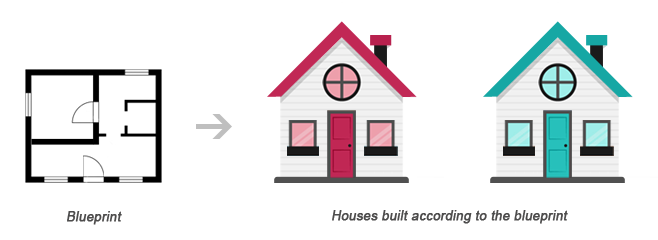
				<p>A class acts as a template or blueprint from which lots of individual objects can be created. When individual objects are created, they inherit the same generic properties and behaviors, although each object may have different values for certain properties.</p>
				<p>For example, think of a class as a blueprint for a house. The blueprint itself is not a house, but is a detailed plan of the house. While, an object is like an actual house built according to that blueprint. We can build several identical houses from the same blueprint, but each house may have different paints, interiors and families inside, as shown in the illustration below.</p>
                <p class="text-center"><img src="../lib/images/class-object-relationship-illustration.png" alt="Class Object Relationship Illustration" /></p>
				<p>A class can be declared using the <code>class</code> keyword, followed by the name of the class and a pair of curly braces (<code>{}</code>), as shown in the following example.</p>
                <p>Let's create a PHP file named Rectangle.php and put the following example code inside it so that our class code should be separated from rest of the program. We can then use it wherever it's needed by simply including the Rectangle.php file.</p>
                <!--Code box-->
				<div class="example">
					<div class="codebox">
						<div class="codebox-title"><h4>Example</h4><a href="https://www.tutorialrepublic.com/examples/bin/download-source.php?topic=php&amp;file=Rectangle" target="_top" class="download-btn" title="Download Source Code"><span>Download</span></a></div>
						<pre class="syntax-highlighter line-numbers"><code class="language-php">&lt;?php
class Rectangle
{
    // Declare  properties
    public $length = 0;
    public $width = 0;
    
    // Method to get the perimeter
    public function getPerimeter(){
        return (2 * ($this->length + $this->width));
    }
    
    // Method to get the area
    public function getArea(){
        return ($this->length * $this->width);
    }
}
?&gt;</code></pre>
					</div>
				</div>
				<!--End:Code box-->
				<p>The <code>public</code> keyword before the properties and methods in the example above, is an <a href="php-classes-and-objects.php.html#oop-access-modifier">access modifier</a>, which indicates that this property or method is accessible from anywhere. We will learn more about this a little later in this chapter.</p>
                <!--Note box-->
                <div class="color-box">
                    <div class="shadow">
                        <div class="info-tab note-icon" title="Important Notes"><i></i></div>
                        <div class="note-box">
                            <p><strong>Note:</strong> Syntactically, variables within a class are called <em>properties</em>, whereas functions are called <em>methods</em>. Also class names conventionally are written in PascalCase i.e. each concatenated word starts with an uppercase letter (e.g. MyClass).</p>
                        </div>
                    </div>
                </div>
                <!--End:Note box-->
				<p>Once a class has been defined, objects can be created from the class with the <code>new</code> keyword. Class methods and properties can directly be accessed through this object instance.</p>
				<p>Create another PHP file name test.php and put the following code inside it.</p>
                <!--Code box-->
				<div class="example">
					<div class="codebox">
						<div class="codebox-title"><h4>Example</h4><a href="../codelab.php%3Ftopic=php&amp;file=creating-objects-from-a-class.html" target="_blank" class="try-btn" title="Run this code to view the output">Run this code <span>&raquo;</span></a></div>
						<pre class="syntax-highlighter line-numbers"><code class="language-php">&lt;?php
// Include class definition
require "Rectangle.php";
 
// Create a new object from Rectangle class
$obj = new Rectangle;
 
// Get the object properties values
echo $obj->length; // 0utput: 0
echo $obj->width; // 0utput: 0
 
// Set object properties values
$obj->length = 30;
$obj->width = 20;
 
// Read the object properties values again to show the change
echo $obj->length; // 0utput: 30
echo $obj->width; // 0utput: 20
 
 
// Call the object methods
echo $obj->getPerimeter(); // 0utput: 100
echo $obj->getArea(); // Output: 600
?&gt;</code></pre>
					</div>
				</div>
				<!--End:Code box-->
                <p>The arrow symbol (<code>-&gt;</code>) is an OOP construct that is used to access contained properties and methods of a given object. Whereas, the pseudo-variable <code>$this</code> provides a reference to the calling object i.e. the object to which the method belongs.</p>
                <p>The real power of object oriented programming becomes evident when using multiple instances of the same class, as shown in the following example:</p>
				<!--Code box-->
				<div class="example">
					<div class="codebox">
						<div class="codebox-title"><h4>Example</h4><a href="../codelab.php%3Ftopic=php&amp;file=using-multiple-objects-of-the-same-class.html" target="_blank" class="try-btn" title="Run this code to view the output">Run this code <span>&raquo;</span></a></div>
						<pre class="syntax-highlighter line-numbers"><code class="language-php">&lt;?php
// Include class definition
require "Rectangle.php";
 
// Create multiple objects from the Rectangle class
$obj1 = new Rectangle;
$obj2 = new Rectangle;
 
// Call the methods of both the objects
echo $obj1->getArea(); // Output: 0
echo $obj2->getArea(); // Output: 0
 
// Set $obj1 properties values
$obj1->length = 30;
$obj1->width = 20;
 
// Set $obj2 properties values
$obj2->length = 35;
$obj2->width = 50;
 
// Call the methods of both the objects again
echo $obj1->getArea(); // Output: 600
echo $obj2->getArea(); // Output: 1750
?&gt;</code></pre>
					</div>
				</div>
				<!--End:Code box-->
				<p>As you can see in the above example, calling the <code>getArea()</code> method on different objects causes that method to operate on a different set of data. Each object instance is completely independent, with its own properties and methods, and thus can be manipulated independently, even if they're of the same class.</p>
                <hr />
                <h2>Using Constructors and Destructors</h2>
                <p>To make the object-oriented programming easier, PHP provides some magic methods that are executed automatically when certain actions occur within an object.</p>
                <p>For example, the magic method <code>__construct()</code> (known as <em>constructor</em>) is executed automatically whenever a new object is created. Similarly, the magic method <code>__destruct()</code> (known as <em>destructor</em>) is executed automatically when the object is destroyed. A destructor function cleans up any resources allocated to an object once the object is destroyed.</p>
                <!--Code box-->
				<div class="example">
					<div class="codebox">
						<div class="codebox-title"><h4>Example</h4><a href="../codelab.php%3Ftopic=php&amp;file=execute-code-automatically-with-constructor-and-destructor.html" target="_blank" class="try-btn" title="Run this code to view the output">Run this code <span>&raquo;</span></a></div>
						<pre class="syntax-highlighter line-numbers"><code class="language-php">&lt;?php
class MyClass
{
    // Constructor
    public function __construct(){
        echo 'The class "' . __CLASS__ . '" was initiated!&lt;br&gt;';
    }
    
    // Destructor
    public function __destruct(){
        echo 'The class "' . __CLASS__ . '" was destroyed.&lt;br&gt;';
    }
}
 
// Create a new object
$obj = new MyClass;
 
// Output a message at the end of the file
echo "The end of the file is reached.";
?&gt;</code></pre>
					</div>
				</div>
				<!--End:Code box-->
				
				<p>The PHP code in the above example will produce the following output:</p>
				<div class="output-box">
The class "MyClass" was initiated!<br />
The end of the file is reached.<br />
The class "MyClass" was destroyed.
                </div>
				<p>A destructor is called automatically when a scripts ends. However, to explicitly trigger the destructor, you can destroy the object using the PHP <code>unset()</code> function, as follow:</p>
                <!--Code box-->
				<div class="example">
					<div class="codebox">
						<div class="codebox-title"><h4>Example</h4><a href="../codelab.php%3Ftopic=php&amp;file=destroying-an-object-manually.html" target="_blank" class="try-btn" title="Run this code to view the output">Run this code <span>&raquo;</span></a></div>
						<pre class="syntax-highlighter line-numbers"><code class="language-php">&lt;?php
class MyClass
{
    // Constructor
    public function __construct(){
        echo 'The class "' . __CLASS__ . '" was initiated!&lt;br&gt;';
    }
    
    // Destructor
    public function __destruct(){
    echo 'The class "' . __CLASS__ . '" was destroyed.&lt;br&gt;';
    }
}
 
// Create a new object
$obj = new MyClass;
 
// Destroy the object
unset($obj);
 
// Output a message at the end of the file
echo "The end of the file is reached.";
?&gt;</code></pre>
					</div>
				</div>
				<!--End:Code box-->
				<p>Now, the PHP code in the above example will produce the following output:</p>
				<div class="output-box">
The class "MyClass" was initiated!<br>
The class "MyClass" was destroyed.<br>
The end of the file is reached.
                </div>
				<!--Tip Box-->
                <div class="color-box space">
                    <div class="shadow">
                        <div class="info-tab tip-icon" title="Useful Tips"><i></i></div>
                        <div class="tip-box">
                            <p><strong>Tip:</strong> PHP automatically clean up all resources allocated during execution when the script is finished, e.g. closing database connections, destroying objects, etc.</p>
                        </div>
                    </div>
                </div>
                <!--End:Tip Box-->
				<!--Note box-->
                <div class="color-box">
                    <div class="shadow">
                        <div class="info-tab note-icon" title="Important Notes"><i></i></div>
                        <div class="note-box">
                            <p><strong>Note:</strong> The <code>__CLASS__</code> is a <a href="php-magic-constants.php.html">magic constant</a> which contains the name of the class in which it is occur. It is empty, if it occurs outside of the class.</p>
                        </div>
                    </div>
                </div>
                <!--End:Note box-->
				<hr />
				<h2>Extending Classes through Inheritance</h2>
				<p>Classes can inherit the properties and methods of another class using the <code>extends</code> keyword. This process of extensibility is called inheritance. It is probably the most powerful reason behind using the object-oriented programming model.</p>
				<!--Code box-->
				<div class="example">
					<div class="codebox">
						<div class="codebox-title"><h4>Example</h4><a href="../codelab.php%3Ftopic=php&amp;file=class-inheritance.html" target="_blank" class="try-btn" title="Run this code to view the output">Run this code <span>&raquo;</span></a></div>
						<pre class="syntax-highlighter line-numbers"><code class="language-php">&lt;?php
// Include class definition
require "Rectangle.php";
 
// Define a new class based on an existing class
class Square extends Rectangle
{   
    // Method to test if the rectangle is also a square
    public function isSquare(){
        if($this->length == $this->width){
            return true; // Square
        } else{
            return false; // Not a square
        }
    }
}
 
// Create a new object from Square class
$obj = new Square;
 
// Set object properties values
$obj->length = 20;
$obj->width = 20;
 
// Call the object methods
if($obj->isSquare()){
    echo "The area of the square is ";
} else{
    echo "The area of the rectangle is ";
};
echo $obj->getArea();
?&gt;</code></pre>
					</div>
				</div>
				<!--End:Code box-->
				<p>The PHP code in the above example will produce the following output:</p>
				<div class="output-box">The area of the square is 400</div>
				<p>As you can see in the above example, even though the class definition of Square doesn't explicitly contain <code>getArea()</code> method nor the <code>$length</code> and <code>$width</code> property, instances of the Square class can use them, as they inherited from the parent Rectangle class.</p>
				<!--Tip Box-->
                <div class="color-box space">
                    <div class="shadow">
                        <div class="info-tab tip-icon" title="Useful Tips"><i></i></div>
                        <div class="tip-box">
                            <p><strong>Tip:</strong> Since a child class is derived from a parent class, it is also referred to as a derived class, and its parent is called the base class.</p>
                        </div>
                    </div>
                </div>
                <!--End:Tip Box-->
				<hr />
				<h2 id="oop-access-modifier">Controlling the Visibility of Properties and Methods</h2>
				<p>When working with classes, you can even restrict access to its properties and methods using the <em>visibility keywords</em> for greater control. There are three visibility keywords (from most visible to least visible): <code>public</code>, <code>protected</code>, <code>private</code>, which determines how and from where properties and methods can be accessed and modified.</p>
				<ul>
					<li><strong>public</strong> &mdash; A public property or method can be accessed anywhere, from within the class and outside. This is the default visibility for all class members in PHP.</li>
					<li><strong>protected</strong> &mdash;  A protected property or method can only be accessed from within the class itself or in child or inherited classes i.e. classes that extends that class.</li>
					<li><strong>private</strong> &mdash; A private property or method is accessible only from within the class that defines it. Even child or inherited classes cannot access private properties or methods.</li>
				</ul>
				<p>The following example will show you how this visibility actually works:</p>
				<!--Code box-->
				<div class="example">
					<div class="codebox">
						<div class="codebox-title"><h4>Example</h4><a href="https://www.tutorialrepublic.com/examples/bin/download-source.php?topic=php&amp;file=access-control-modifiers" target="_top" class="download-btn" title="Download Source Code"><span>Download</span></a></div>
						<pre class="syntax-highlighter line-numbers"><code class="language-php">&lt;?php
// Class definition
class Automobile
{
    // Declare  properties
    public $fuel;
    protected $engine;
    private $transmission;
}
class Car extends Automobile
{
    // Constructor
    public function __construct(){
        echo 'The class "' . __CLASS__ . '" was initiated!&lt;br&gt;';
    }
}
 
// Create an object from Automobile class
$automobile = new Automobile;
 
// Attempt to set $automobile object properties
$automobile->fuel = 'Petrol'; // ok
$automobile->engine = '1500 cc'; // fatal error
$automobile->transmission = 'Manual'; // fatal error
 
// Create an object from Car class
$car = new Car;
 
// Attempt to set $car object properties
$car->fuel = 'Diesel'; // ok
$car->engine = '2200 cc'; // fatal error
$car->transmission = 'Automatic'; // undefined
?&gt;</code></pre>
					</div>
				</div>
				<!--End:Code box-->
                <hr />
                <h2>Static Properties and Methods</h2>
				<p>In addition to the visibility, properties and methods can also be declared as <code>static</code>, which makes them accessible without needing an instantiation of the class. Static properties and methods can be accessed using the scope resolution operator (<code>::</code>), like this: <code>ClassName::$property</code> and <code>ClassName::method()</code>.</p>
				<p>A property declared as static cannot be accessed via the object of that class though a static method can be, as demonstrated in the following example:</p>
				<!--Code box-->
				<div class="example">
					<div class="codebox">
						<div class="codebox-title"><h4>Example</h4><a href="https://www.tutorialrepublic.com/examples/bin/download-source.php?topic=php&amp;file=static-properties-and-methods" target="_top" class="download-btn" title="Download Source Code"><span>Download</span></a></div>
						<pre class="syntax-highlighter line-numbers"><code class="language-php">&lt;?php
// Class definition
class HelloClass
{
    // Declare a static property
    public static $greeting = "Hello World!";
    
    // Declare a static method
    public static function sayHello(){
        echo self::$greeting;
    }
}
// Attempt to access static property and method directly
echo HelloClass::$greeting; // Output: Hello World!
HelloClass::sayHello(); // Output: Hello World!
 
// Attempt to access static property and method via object
$hello = new HelloClass;
echo $hello->greeting; // Strict Warning
$hello->sayHello(); // Output: Hello World!
?&gt;</code></pre>
					</div>
				</div>
				<!--End:Code box-->
				<p>The keyword <code>self</code> in the above example means "the current class". It is never preceded by a dollar sign (<code>$</code>) and always followed by the <code>::</code> operator (e.g. <code>self::$name</code>).</p>
				<p>The <code>self</code> keyword is different from the <code>this</code> keyword which means "the current object" or&nbsp; "the current instance of a class". The <code>this</code> keyword is always preceded by a dollar sign (<code>$</code>) and followed by the <code>-&gt;</code> operator (e.g. <code>$this->name</code>).</p>
				<!--Note box-->
                <div class="color-box break">
                    <div class="shadow">
                        <div class="info-tab note-icon" title="Important Notes"><i></i></div>
                        <div class="note-box">
                            <p><strong>Note:</strong> Since static methods can be called without an instance of a class (i.e. object), the pseudo-variable <code>$this</code> is not available inside the method declared as static.</p>
                        </div>
                    </div>
                </div>
                <!--End:Note box-->
				<p>We hope you've understood the basic concepts of object-oriented programming by now. You'll find more examples on OOP in PHP and MySQL database section.</p>
				<!--Bottom Navigation-->
                <div class="bottom-link clearfix">
                    <a href="php-error-handling.php.html" class="previous-page-bottom">Previous Page</a>
                    <a href="php-magic-constants.php.html" class="next-page-bottom">Next Page</a>
                </div>
                <!--End:Bottom Navigation-->
                <!-- InstanceEndEditable -->
                <div class="bottom-ad clearfix">

     <div class="ad-label">Advertisements</div>

     <!--Rectangle Left-->
     <div class="rectangle-left fl">
          <script async src="https://pagead2.googlesyndication.com/pagead/js/adsbygoogle.js"></script>
          <!-- Large Rectangle Left -->
          <ins class="adsbygoogle"
               style="display:inline-block;width:336px;height:280px"
               data-ad-client="ca-pub-9107540490929984"
               data-ad-slot="8162953958"></ins>
          <script>
          (adsbygoogle = window.adsbygoogle || []).push({});
          </script>
     </div>
     <!--End:Rectangle Left-->

     <!--Rectangle Right-->
     <div class="rectangle-right fr">
          <script async src="https://pagead2.googlesyndication.com/pagead/js/adsbygoogle.js"></script>
          <!-- Large Rectangle Right -->
          <ins class="adsbygoogle"
               style="display:inline-block;width:336px;height:280px"
               data-ad-client="ca-pub-9107540490929984"
               data-ad-slot="3324015654"></ins>
          <script>
          (adsbygoogle = window.adsbygoogle || []).push({});
          </script>
     </div>
     <!--End:Rectangle Right-->

</div>

            </div>
            <!--End:Text Content-->
            <!--Feedback Form-->
			<div class="snippets">
	<a href="../snippets/gallery.php.html" target="_blank"><img src="../lib/images/bootstrap-code-snippets.png" alt="Bootstrap UI Design Templates" /></a>
</div>            <!--End:Feedback Form-->
        </div>        
        <div class="rightcolumn">
            <div class="sidebar">
    
    <div class="ad-label">Advertisements</div>

    <div class="skyscraper primary">
        <script async src="https://pagead2.googlesyndication.com/pagead/js/adsbygoogle.js"></script>
        <!-- Premium Skyscraper -->
        <ins class="adsbygoogle"
            style="display:inline-block;width:160px;height:600px"
            data-ad-client="ca-pub-9107540490929984"
            data-ad-slot="4376141825"></ins>
        <script>
        (adsbygoogle = window.adsbygoogle || []).push({});
        </script>
    </div>

    <div class="skyscraper">
     <script async src="https://pagead2.googlesyndication.com/pagead/js/adsbygoogle.js"></script>
     <!-- Bottom Skyscraper -->
     <ins class="adsbygoogle"
          style="display:inline-block;width:160px;height:600px"
          data-ad-client="ca-pub-9107540490929984"
          data-ad-slot="3387984471"></ins>
     <script>
     (adsbygoogle = window.adsbygoogle || []).push({});
     </script>
</div>
</div>        </div>
    </div>
    <!--Footer-->
	<!--Footer-->
<div class="footer">
    <div class="appeal">
        <div class="wrapper">
            <p>Is this website helpful to you? Please give us a
            <a href="../like.php.html" onclick="javascript:window.open(this.href, '', 'menubar=no,toolbar=no,resizable=yes,scrollbars=yes,height=250,width=600,top=150, left='+((screen.width/2)-300));return false;">like</a>,
            or share your <a href="../contact-us.php.html" target="_blank">feedback</a><em> to help us improve</em>.
            Connect with us on <a href="https://www.facebook.com/tutorialrepublic" target="_blank">Facebook</a> and <a href="https://twitter.com/tutrepublic" target="_blank">Twitter</a> for the latest updates.</p>               
        </div>
    </div>
    <div class="footer-inner">
        <div class="wrapper clearfix">                
            <div class="link-box">
                <h4>About Us</h4>
                <div class="clearfix">
                    <a href="../about-us.php.html">Our Story</a>                    
                    <a href="../terms-of-use.php.html">Terms of Use</a>
                    <a href="../privacy-policy.php.html">Privacy Policy</a>                    
                </div>
            </div>
            <div class="link-box">
                <h4>Contact</h4>
                <div class="clearfix">
                    <a href="../contact-us.php.html">Contact Us</a>                    
                    <a href="../contact-us.php.html" target="_blank">Report Error</a>
                    <a href="../advertise-with-us.php.html">Advertise</a>                    
                </div>
            </div>
            <div class="tool-box">
                <h4>Interactive Tools</h4>
                <div class="tools-list clearfix" id="tools">
                    <a href="../font-awesome-icons-classes.php.html" target="_blank">Font Awesome Icon Search Utility</a>
                    <a href="../html-formatter.php.html" target="_blank">HTML Formatter</a>
                    <a href="../faq/what-is-the-maximum-length-of-title-and-meta-description-tag.php.html">Title &amp; Meta Length Calculator</a>
                    <a href="../html-reference/html-color-picker.php.html">HTML Color Picker</a>
                    <a href="../twitter-bootstrap-button-generator.php.html" target="_blank">Bootstrap Button Generator</a>
                    <a href="../codelab.php%3Ftopic=sql&amp;file=select-all.html" target="_blank">SQL Playground</a>
                    <a href="../bootstrap-icons-classes.php.html" target="_blank">Bootstrap Icon Finder</a>
                    <a href="../codelab.php%3Ftopic=html&amp;file=hello-world.html" target="_blank">HTML Editor</a>
                </div>
            </div>
            <div class="footer-logo">
                <p><img src="../lib/images/logo.svg" alt="TutorialRepublic" /><p>
					<div>
						<a href="https://www.buymeacoffee.com/tutrepublic" class="bmc-btn" rel="nofollow" target="_blank">
    						<img src="../lib/images/bmc-btn.png" alt="BMC" />
						</a>
					</div>
            </div>
        </div>
    </div>           
        <div class="bottom-strip">
        <div class="wrapper">
            <div class="notice">Copyright &copy; 2022 Tutorial Republic. All Rights Reserved.</div>
            <div class="social-media">
                <em>Share This:</em>
                <a href="https://facebook.com/sharer.php?u=https://www.tutorialrepublic.com%2Fphp-tutorial%2Fphp-classes-and-objects.php" onclick="javascript:window.open(this.href, '', 'menubar=no,toolbar=no,resizable=yes,scrollbars=yes,height=300,width=600,top=150, left='+((screen.width/2)-300));return false;" title="Facebook"><i class="icon-facebook"></i></a>
                <a href="php-classes-and-objects.php.html#" id="tweet-btn" onclick="javascript:window.open(this.href, '', 'menubar=no,toolbar=no,resizable=yes,scrollbars=yes,height=300,width=600,top=150, left='+((screen.width/2)-300));return false;" title="Twitter"><i class="icon-twitter"></i></a>
                <a href="php-classes-and-objects.php.html#" id="email-btn" onclick="javascript:window.open(this.href, '', 'menubar=no,toolbar=no,resizable=yes,scrollbars=yes,height=300,width=600,top=150, left='+((screen.width/2)-300));return false;" rel="noreferrer" title="Gmail"><i class="icon-mail"></i></a>
            </div>
        </div>            
    </div>
    <script>
        var title = document.title.replace('- Tutorial Republic', '');
        document.getElementById('tweet-btn').href = 'https://twitter.com/share?text=' + title + '- &url=https://www.tutorialrepublic.com%2Fphp-tutorial%2Fphp-classes-and-objects.php';
        document.getElementById('email-btn').href = 'https://mail.google.com/mail/?view=cm&fs=1&su=' + title + '&body=https://www.tutorialrepublic.com%2Fphp-tutorial%2Fphp-classes-and-objects.php';
    </script>
</div>
<!--End:Footer-->
    
<div class="backdrop mobile-only"></div>

<!-- TutorialRepublic base script -->
<script>
// Adding CSS files
[	
	'/lib/styles/legacy/extended-1.1.css',
	'/lib/icomoon/style.css'
].forEach(function(href) {
	var link = document.createElement('link');
	link.rel = 'stylesheet';
	link.href = href;
	(document.getElementsByTagName('head')[0]).appendChild(link);
});

// Adding JS files
[
	'https://ajax.googleapis.com/ajax/libs/jquery/2.2.4/jquery.min.js',
	'/lib/js/prism.js',
	'/lib/js/default-1.3.js'
].forEach(function(src) {
	var script = document.createElement('script');
	script.async = false; // important
	script.src = src;
	(document.getElementsByTagName('body')[0]).appendChild(script);
});
</script>


    <!--End:Footer-->
</body>
<!-- InstanceEnd --></html>